- 28-
14. Household Interphone Diagnosis
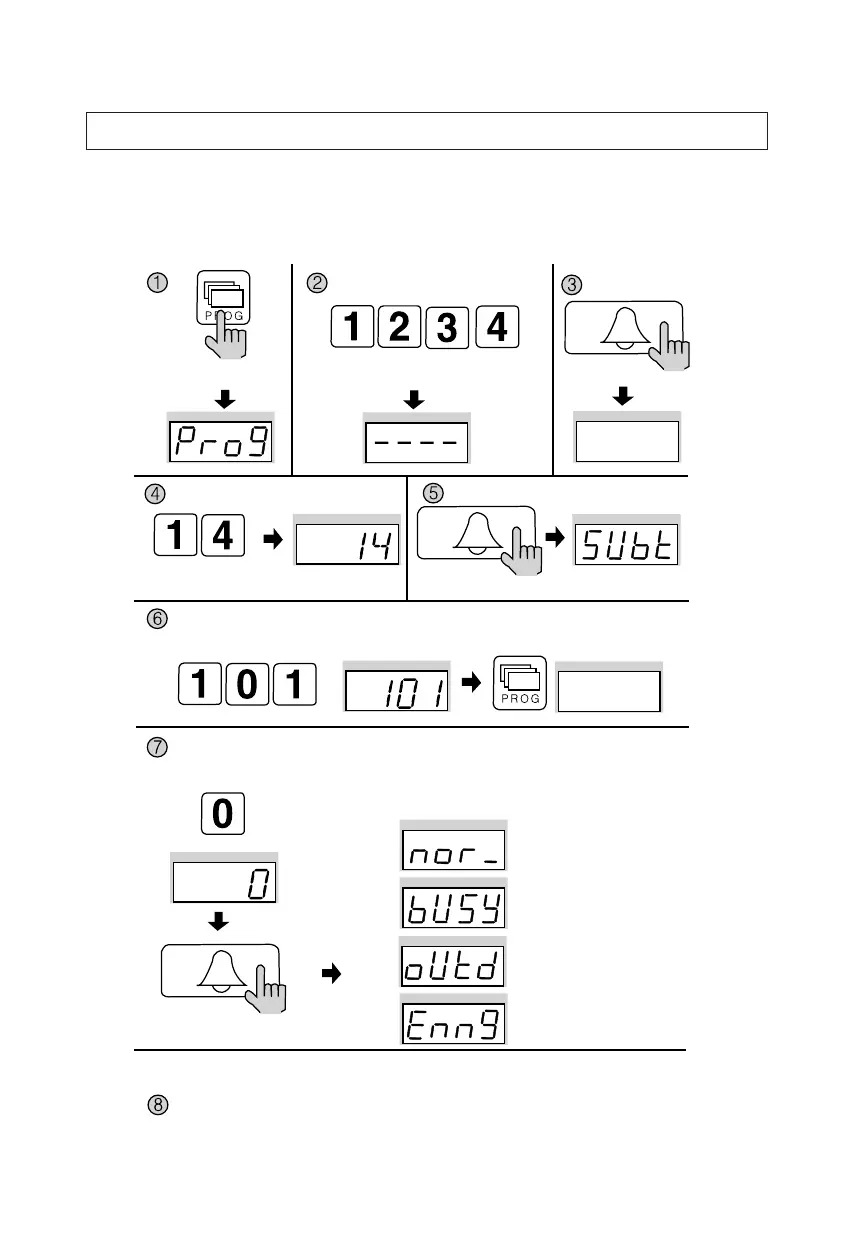
✽ P - Building (Management) PIN - E - 14 - E - Household Number - E
✽ This feature checks for the Household Interphone’s operating conditions.
Press the Program button (P).
Enter the Building (Management) PIN.
ex) Building PIN
Press the
Call button (E).
Check feature the
Household Videophone
Press the
Call button (E).
Press the
Call button (E).
Press the Program Number (14).
Enter the Household Number, then press the Program button.
Enter the Multi Sub Number, then press the Page button (E).
You can check the whole households in the same way.
After checkup, push the cancel button.
✽After checking the currently displayed household, it will show automatically a next household.
Push the call button to check a next household.
ex) check for 101
ex) check for master status
The Household’s status is shown on the display window (FND).
Normal status
Busy status
Away status
Emergency status


 To Next Page