- 29-
① Press the Program button (P). (‘Prog’will appear)
② Enter the Building (Management) PIN.
③ Press the Page button (E).
④ Enter number 14 (Household Interphone Diagnosis).
⑤ Press the Page button (E). (‘Subt’will appear)
⑥ Enter the Household Number, then press the Program button.
⑦ Enter the Multi Sub Number, then press the Page button (E).
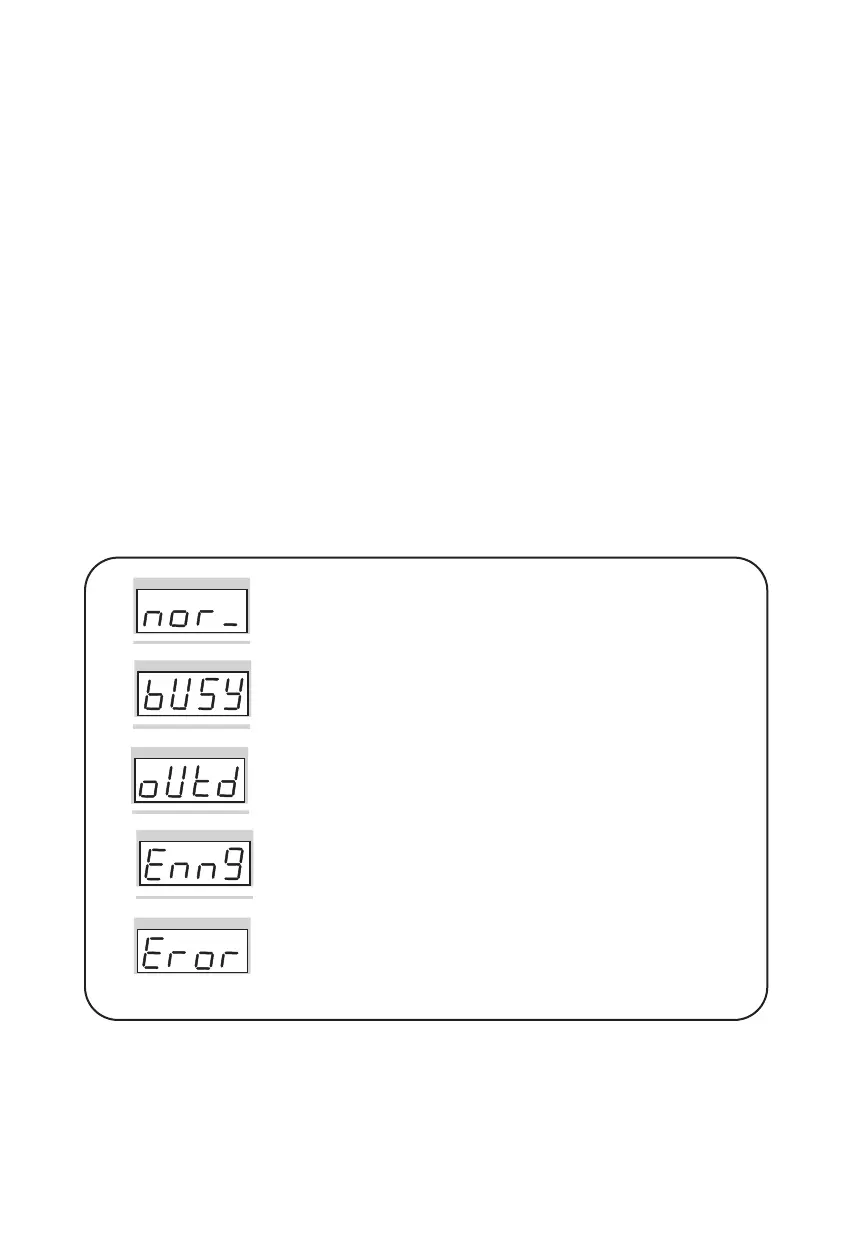
The Household’s status is shown on the display window (FND).
(Please refer to the following indications)
⑧ To check other Households, repeat steps 6 and 7.
Press the Cancel button (X) to terminate the feature.
✽ Household Status
Normal Status - The Household is in standby.
(Normal will also be indicated if the Household is in conversation
with the Entrance or on the phone)
Busy Status - The Household is on the phone.
(Busy status is only shown when in conversation with the
Guardhouse)
Away Status - Residents are currently away from their Household.
Emergency Status - There is an emergency situation in the
Household.
(Emergency, Warning 1 (Fire), Warning 2 (Gas), Burglary, and etc
are indicated as emergency situations)
Error Status - Connection could not be established with the
Household. (Please check the Household Videophone)


 To Next Page