- 25-
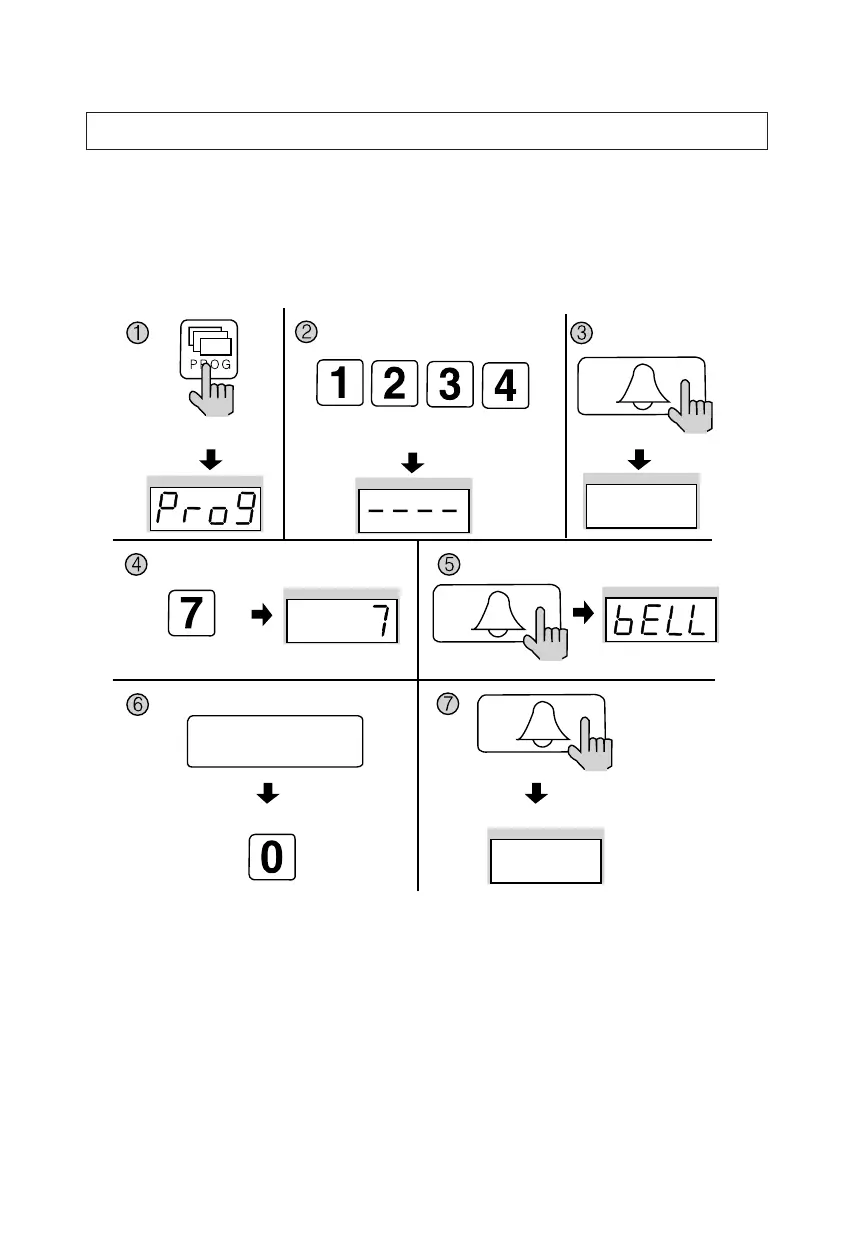
11. Page Tone Selection
✽ P - Building (Management) PIN - E - 7 - E - 0 - E: Melody Tone
✽ P - Building (Management) PIN - E - 7 - E - 1 - E: Bell (Ringer)
✽ This feature sets the Recall tone heard when Households or the Guardhouse is
paged from the Main Entrance.
① Press the Program button (P). (‘Prog’will appear)
② Enter the Building (Management) PIN.
③ Press the Call button (E).
④ Press number 7 (Page Signal Selection).
⑤ Press the Call button (E). (Previous selection is displayed)
⑥ Select a page signal.
✽ 0: Melody Tone
✽ 1: Bell (Ringer)
⑦ Press the Call button (E). (Page signal updated)
Press the Program button (P).
Enter the Building (Management) PIN.
ex) Building PIN
Press the
Call button (E).
The current capacity
is displayed.
Press the
Call button (E).
Press the
Call button (E).
Press the Program Number (7).
Selection a Page Signal
0: Melody Tone
1: BELL Tone(RINGER)
Page signal updated
ex) Selection a Page Signal selected melody tone


 To Next Page