EasyManua.ls Logo

Commodore 64C - Navigating the Screen with the Cursor

Commodore 64C
40 pages
Print Icon
To Next Page IconTo Next Page
To Previous Page IconTo Previous Page
Loading...
moving
around
the
screen
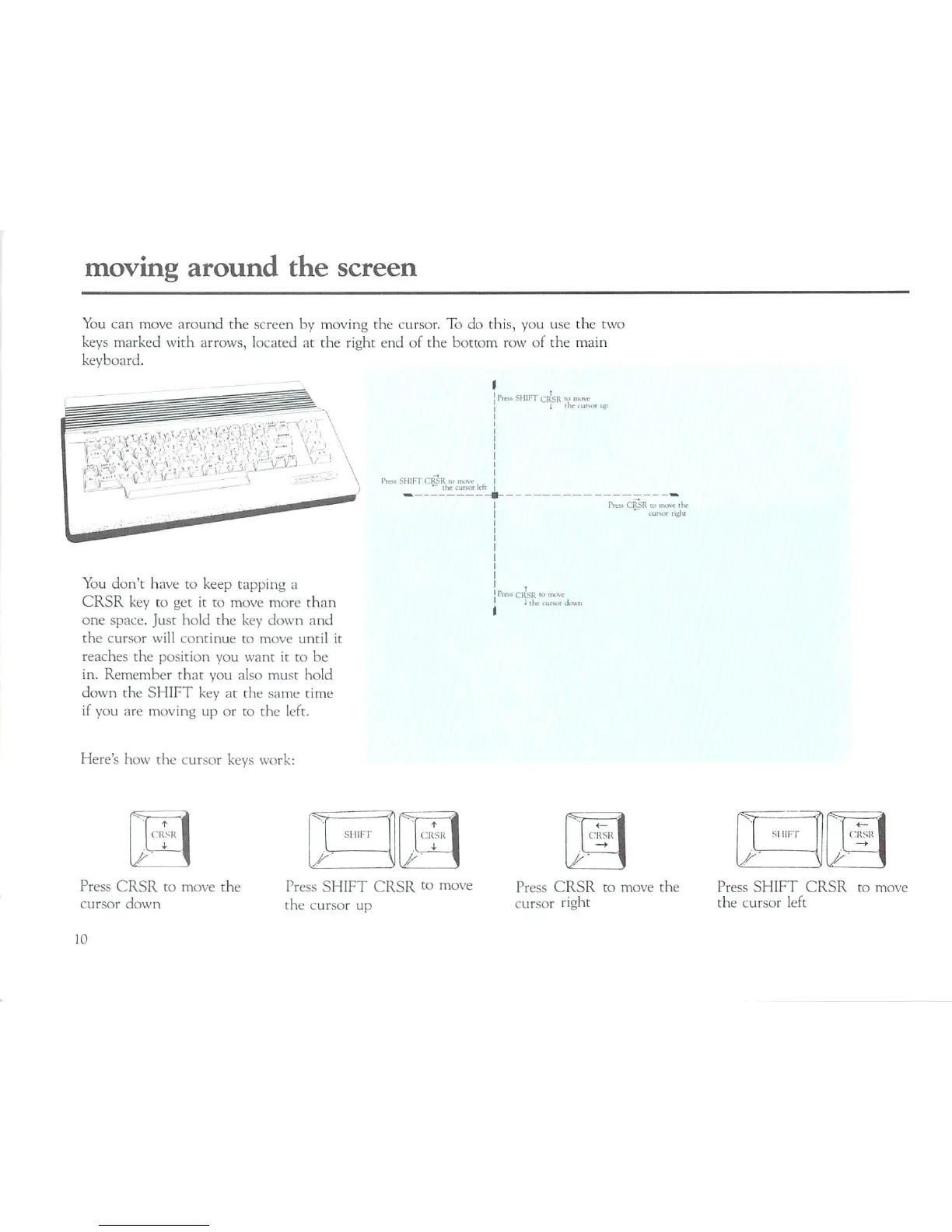
You
can
move
around
the
screen
by
moving
the
cursor.
To do
this,
you
use the
two
keys
marked
with
arrows,
located
at
the
right
end
of
the
bottom
row
of
the
main
keyboard.
You
don't
have
to
keep
tapping
a
CRSR
key
to
get
it
to
move
more
than
one
space.
Just
hold
the
key
down
and
the
cursor
will
continue
to
move
until
it
reaches
the position
you want
it
to
be
in.
Remember
that
you
also
must
hold
down
the
SHIFT
key
at
the
same
time
if
you
are
moving
up
or
to
the
left.
-SHIR"
Cr'sR
m
IW
SHIFT
CfiSR
m
m
*~
the
cut
.
CRSR
in
muvc
tlw
Cunof
nelii
CRSR
"'
Here's
how
the
cursor
keys
work:
Press
CRSR
to
move
the
cursor
down
Press
SHIFT
CRSR
to
move
the
cursor
up
SI
HIT
Press
CRSR
to
move
the
cursor
right
Press
SHIFT
CRSR
to
move
the
cursor
left
10

Related product manuals