EasyManua.ls Logo

Commodore 64C - Troubleshooting Common Issues

Commodore 64C
40 pages
Print Icon
To Next Page IconTo Next Page
To Previous Page IconTo Previous Page
Loading...
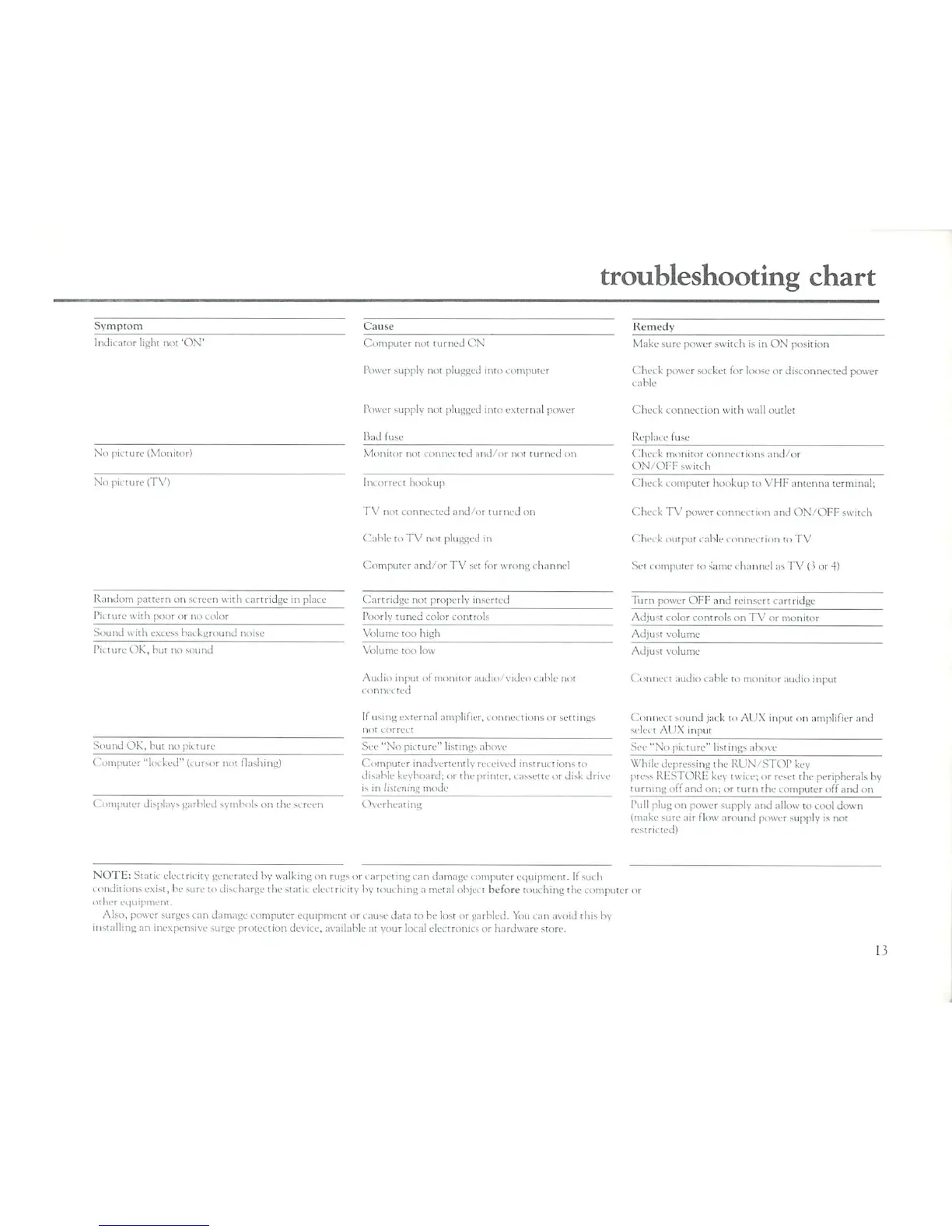
troubleshooting
chart
Symptom
Cause
Remedy
Indicator
light
not
'ON"
No
picture
(Monitor)
No
picture
(TV)
Randc
Pictun
Sound
■■:
■.■■.;
pattern
on
screen
wit]
ith
po.
,r
or
no
color
th excess
background
i
cartridge
in
noise
pi net1
Picture
OK,
but
no
sound
Sound
OK,
but
no
picture
Computer
"locked"
(cursor
not
flashing)
Computer
not
turned
ON
Power
supply
not
plugged
into
computer
Power
supply not
plugged
into
external
power
Bad
fuse
Monitor
not
connected
and/or
not
turned
on
Im
orreci
hookup
TV
not
connected
and/or
turned
on
Cable
toTV
not
plugged
in
Computer
and/or
TV
set
for
wrong
channel
Cartridge
not properly
inserted
Poorly
tuned
color
controls
Volume
too
high
Volume
too
low
Audio
input
ol
monitor
audio/video
cable
not
i
nnne<
ted
[f
using
external
amplifier,
connections
or
settings
not
correct
See
"No
picture"
listings
above
C
Computer
inadvertently
received
instructions
to
disable
keyboard;
or
the
printer,
cassette
or
disk
drive
is
in
listening
mode
Computer
displays
garbled
symbols
on
the
screen
Overheating
Make
sure
power
switt
h
is
in
ON'
position
I
lux k
power
socket
for
loose
or
disconnected
power
cable
Check
connection
with
wall
outlet
Replace
fuse
Check
monitor
conne<
t
ions
and/or
ON/PIT
switch
Check
computer
hookup
to
VHFantenna
terminal;
Check
TV
power
connection
and
ON/OFF
switch
Check
output
cable
connection
to
TV
Set
computer
to
same
channel
:>s
TV
0
ur
4)
Turn
power
OFF
and
reinsert
cartridge
Adjust
color
controls
on
TV
nr
monitor
Adjust
volume
Adjust
volume
(
Connect
audio
cable
io
monitor
audio
input
Connect
sound
jack
to
AUX
input
on
amplifier
and
selet
i
AUX
input
Sec
"No
picture"
listings
above
While
depressing
ilu-RlN
^TOPkcy
press
RESTORE
key
twice;
or
reset
the
peripherals
by
turning
off
and
on;
or
turn
the
computer
off
and
on
Pull
plug
on
power
supply
and
allow
to
cool
down
(make
sure
;iir
flow
around
power
supply
is
not
restricted)
NOTE:
Stati<
electrii
ity
generated
by
walking
on
rugs
or
carpeting
can
damage
computer
equipment.
If
such
conditions
exist,
he
sure
tndist
harge
the
static
electricity
by
touching
;i
metal
objci
t
before touching!
he
computer
or
other
equipment.
Also,
power
surges
can
damage
computer
equipment
or
cause
data
to
he
lost
or
garbled.
You
can
avoid
this
by
installing
an
inexpensive
surge protection
device,
available
at
your
local
electronics
or
hardware
store.
13

Related product manuals