26.
number in the DATA statement corresponds
to
I row in
your
graphic. To design a graphic, follow these steps:
I.
2.
3.
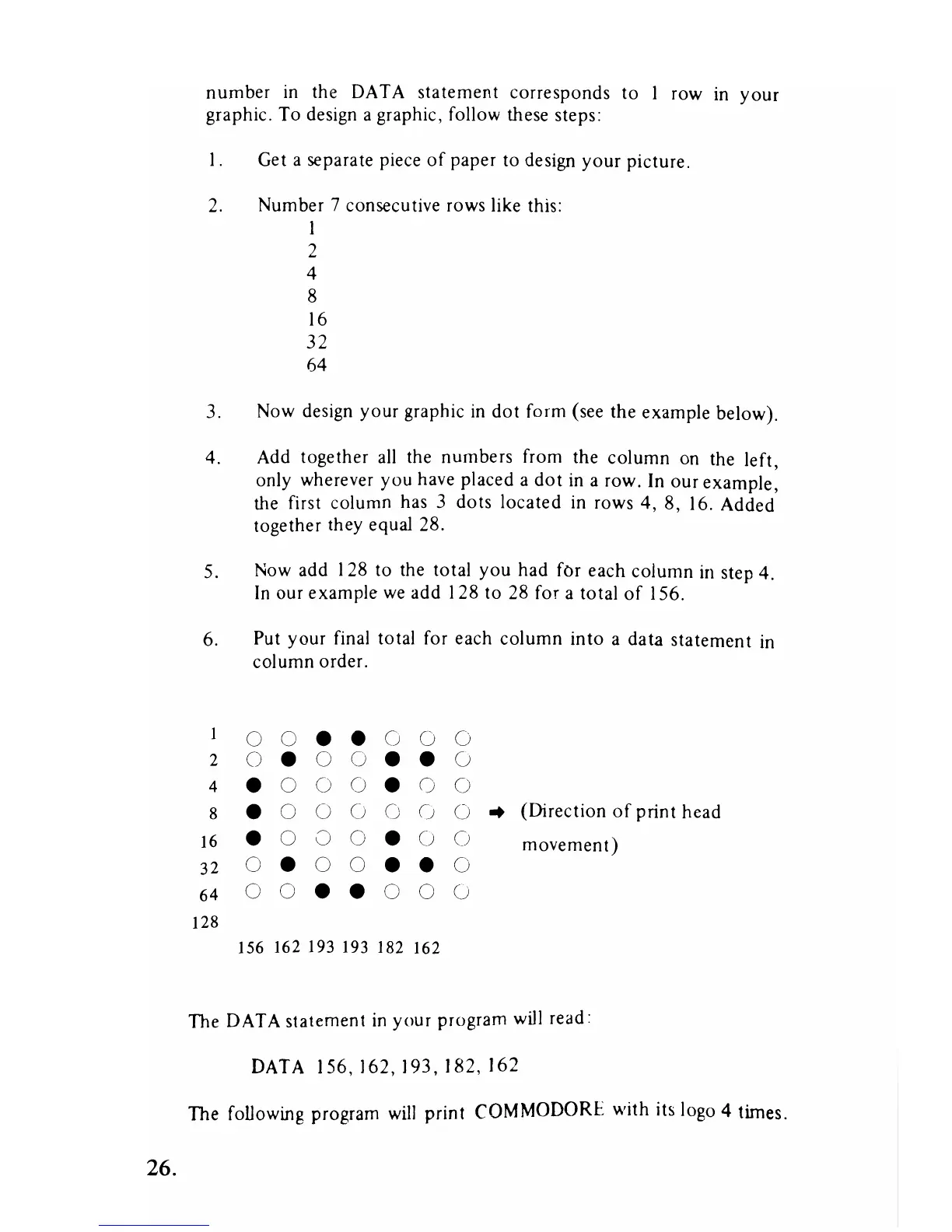
4.
5.
6.
1
2
4
8
16
32
64
128
Get a separate piece
of
paper
to
design
your
picture.
Number 7 consecutive rows like this:
I
2
4
8
16
32
64
Now design
your
graphic
in
dot
form (see the example below).
Add together
all
the numbers from the column on the left
only wherever you have placed a
dot
in a row. In
our
example:
the first column has 3 dots located in rows
4,8,
16. Added
together they equal 28.
Now add 128 to the total
you
had
fOr
each column in step 4.
In
our example
we
add 128 to 28 for a total
of
156.
Put
your
final total for each column into a data statement in
column order.
0 0
•
•
0 0 0
0
•
0 0
• •
0
•
0 0 0
•
0 0
•
0 0 0 0 0 0
..
(Direction
of
print head
•
0 0 0
•
0 0
movement)
0
•
0 0
•
•
0
0 0
•
•
0
0
(j
156
162193193
182 162
The DATA statement
in
your
program will read:
DATA
156,162,193,182,162
The following program
will
print COMMODORE with its logo 4 times.



 To Next Page