J-
Carefully
slide
the right part of the cassette onto the rightmost
edge
of the
cassette holder
and
push
to the left and then down, until the
cassette
locks itself into
the
appropriate
hole.
Now slowly pull the left
half
of the
ribbon
cassette
to
the left.
You
will
see
that
the ribbon itself
begins to
come
out
of
the cassette
already attached.
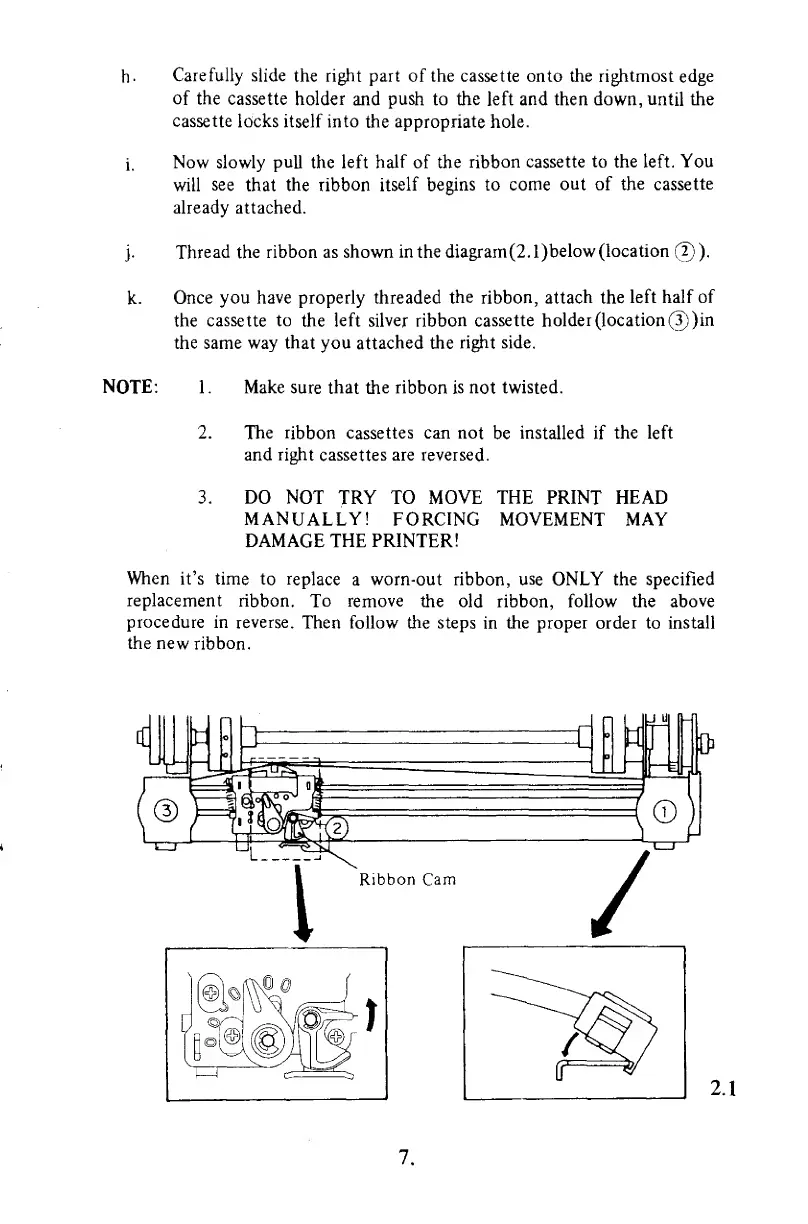
Thread the
ribbon as
shown in the diagram (2.
l)below
(location
(2)
).
k.
Once you have properly threaded
the
ribbon,
attach
the
left half
of
the
cassette
to
the
left silver ribbon
cassette holder (location©)
in
the same way
that
you attached the
right side.
NOTE: 1
.
Make
sure that the ribbon is not
twisted.
2. The
ribbon
cassettes can not
be
installed
if
the
left
and right cassettes are reversed.
3. DO NOT
TRY TO
MOVE THE
PRINT
HEAD
MANUALLY! FORCING
MOVEMENT MAY
DAMAGE THE PRINTER!
When
it's time
to replace
a
worn-out ribbon,
use
ONLY the specified
replacement
ribbon.
To remove
the old ribbon, follow the
above
procedure
in reverse.
Then follow the steps
in
the proper order to install
the new
ribbon.
7.



 To Next Page