EasyManua.ls Logo

Commodore VIC-1525 - CURSOR down Mode; Reverse Field Mode

Commodore VIC-1525
39 pages
Print Icon
To Next Page IconTo Next Page
To Previous Page IconTo Previous Page
Loading...
Example
*****
*****
*****
IS
0PEN4,4
20
PPINT#4,.CHR$a43)SPCa5)'
'****"
30
PRINT#4,CHR$<145)SPCa3)"*****"
40 PRINT#4,
CHRS
<1
45
>3PC<1
5)
'>''
59 PRIHT#4,CHR$(145)3PC(15)"*****
M
60 CMD4:LIST
REflDV.
3.17
4.8 Cursor
Down
Mode
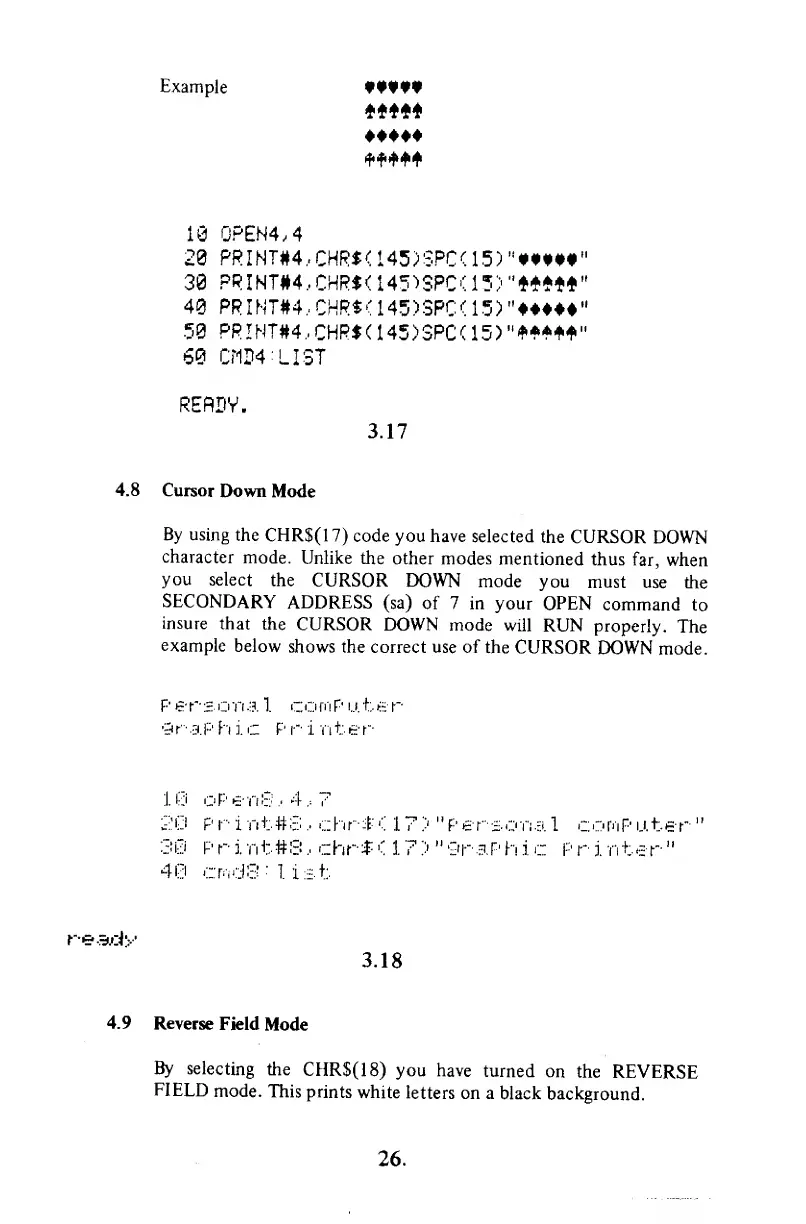
By
using
the
CHR$(17)
code you have
selected
the CURSOR
DOWN
character
mode.
Unlike the
other modes
mentioned
thus
far,
when
you
select
the
CURSOR
DOWN mode
you
must use
the
SECONDARY
ADDRESS
(sa)
of 7 in your
OPEN
command
to
insure
that
the
CURSOR
DOWN mode
will RUN
properly.
The
example
below
shows the
correct use of
the
CURSOR
DOWN
mode.
Personal
c
or
n
P u. t e r
graphic
Pr i Titer
10
oPenS,4,7
2
P r i n t
#
S
,
ch
r
$
< 1
7
') "
P
e r
s o
n
a
1
c:
omp u
t
er
'
'
30 P r i
Tit#3
,
chr$
<
1
7
>
"
9r
aP
h
i
c P r
i
nt
er
"
40
crodS
:
1
ist
ready
3.18
4.9
Reverse
Field
Mode
By
selecting
the
CHR$(18)
you
have
turned
on
the
REVERSE
FIELD
mode.
This
prints
white
letters
on a
black
background.
26.

Other manuals for Commodore VIC-1525

Related product manuals