EasyManua.ls Logo

Commodore VIC-1525 - Paper Loading Instructions

Commodore VIC-1525
39 pages
Print Icon
To Next Page IconTo Next Page
To Previous Page IconTo Previous Page
Loading...
3.
Paper
Instructions
3.1 Paper Loading
Instructions
(See Appendix
A For
Paper Specifica-
tions)
a.
Make sure that the
power
on your printer is
turned
OFF
before loading
the
paper.
b.
Remove
the
printer
cover.
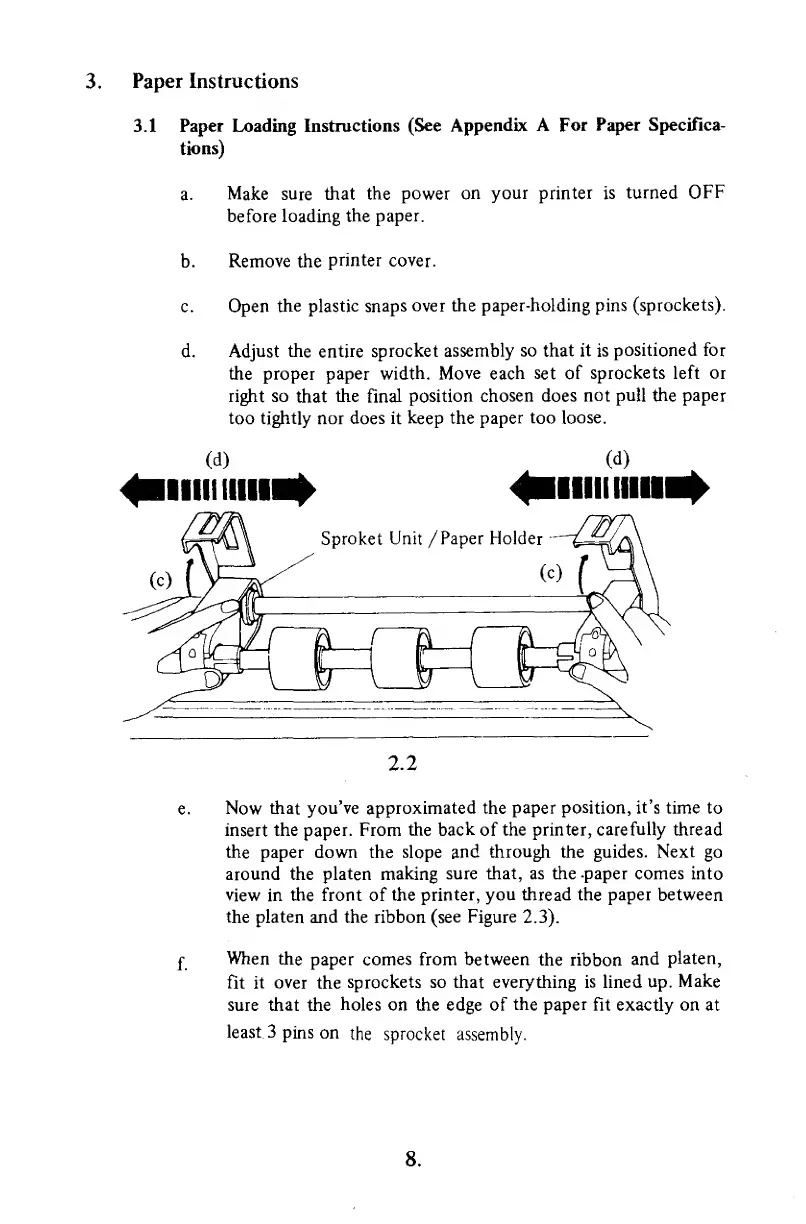
c. Open
the
plastic snaps
over the paper-holding pins
(sprockets).
d.
Adjust
the
entire
sprocket
assembly so that it is
positioned for
the proper paper
width. Move each set of
sprockets left
or
right
so
that
the
final
position
chosen does
not pull the
paper
too tightly nor
does it keep the
paper too
loose.
(d)
mill linn
(d)
llllll
HUH
2.2
Now
that you've approximated the
paper position,
it's
time to
insert
the paper. From
the back
of
the printer,
carefully thread
the paper down the slope and
through
the guides.
Next
go
around the
platen making
sure that, as the -paper comes into
view in the front of the
printer, you thread
the paper between
the platen
and the ribbon
(see Figure
2.3).
When
the
paper comes from between
the
ribbon
and
platen,
fit it over
the
sprockets
so that everything
is
lined
up.
Make
sure
that
the
holes
on the edge of
the
paper
fit exactly on at
least.
3 pins on
the sprocket
assembly.
8.

Other manuals for Commodore VIC-1525

Related product manuals