EasyManua.ls Logo

Commodore VIC-1525 - Paper Loading Final Adjustments

Commodore VIC-1525
39 pages
Print Icon
To Next Page IconTo Next Page
To Previous Page IconTo Previous Page
Loading...
This may seem
difficult
at first,
but
once
you've
made
the final
adjustments
to
position
your
sprocket
assembly
to the
exact
paper
width, you
won't
have
to
adjust
anything
but
the paper in
future
loadings.
Paper
Holder
Ribbon
Paper
Platen
t
^Paper
Holder
l^
\
Sprocket
Unit
4
(
f/og/7
//
&
tr~
fa (
K
[qfbk_j
zi
Ctl
L
Pfl \
o
o
o
o
o
o
o
o
o
2.4
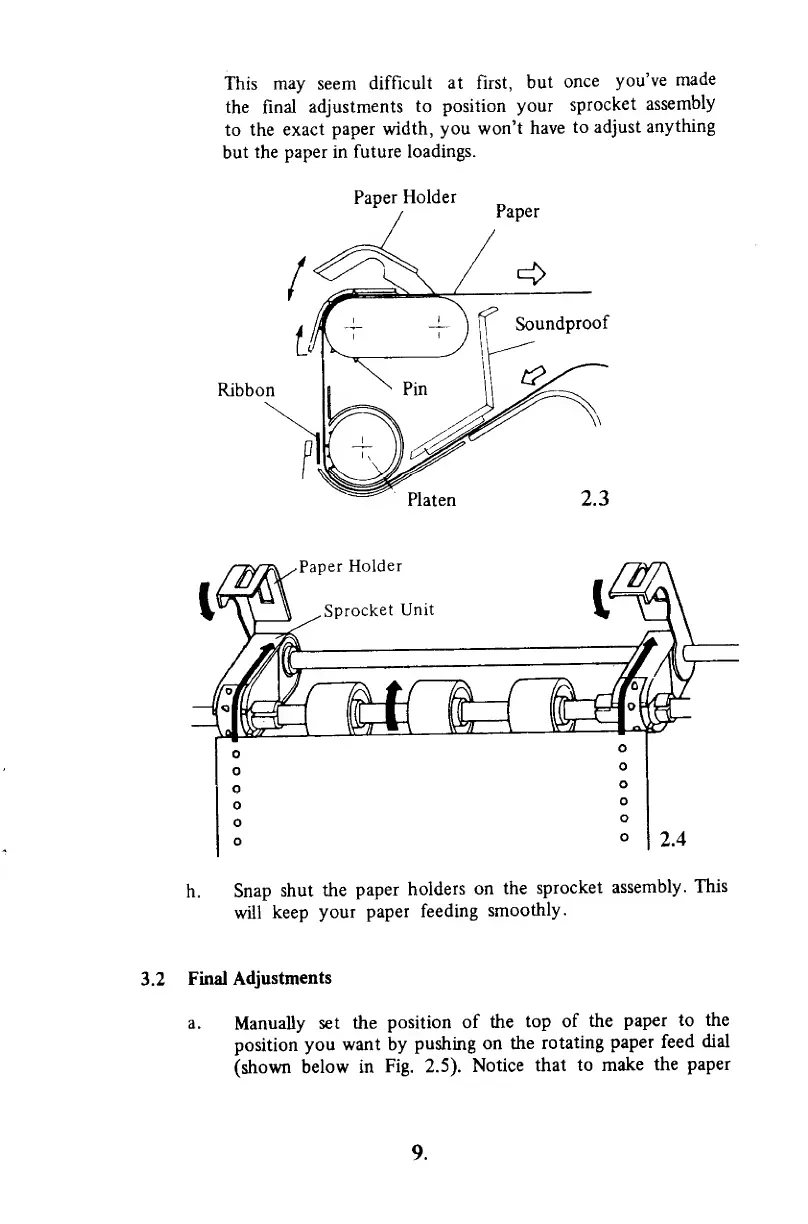
h.
Snap
shut
the
paper
holders
on
the
sprocket
assembly.
This
will
keep your
paper feeding
smoothly.
3.2
Final
Adjustments
a.
Manually
set
the
position
of the
top
of the
paper
to the
position
you
want by
pushing
on
the
rotating
paper
feed
dial
(shown
below in
Fig.
2.5).
Notice
that
to
make
the
paper
9.

Other manuals for Commodore VIC-1525

Related product manuals