EasyManua.ls Logo

Commodore VIC-1525 - Print Pressure Adjustment

Commodore VIC-1525
39 pages
Print Icon
To Next Page IconTo Next Page
To Previous Page IconTo Previous Page
Loading...
move
in a
forward direction, you must
push
the
dial
towards
the
back of
the
printer.
Do
NOT try to make the paper feed
dial
move in
reverse towards the front of the machine.
Paper
Feed Dial
b.
Put the
printer cover
back
on
your
printer. NOTE:
Keep
your
box
of
unused
paper, which
is
to
be
fed
into
the
printer,
in
a
direct line
with
the
sprocket
pins
so that
it will feed
smoothly.
J
3.3 Printing
Pressure
Adjustment
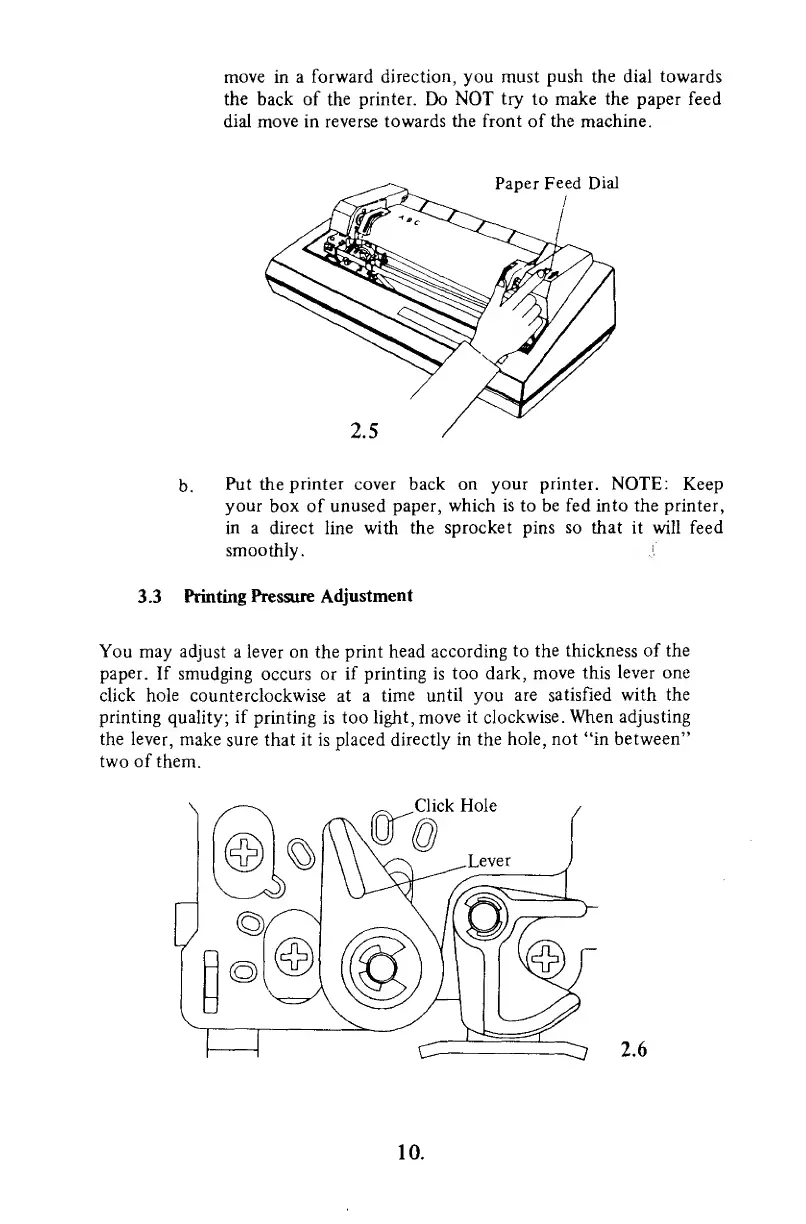
You
may adjust a
lever on
the print head
according
to the thickness
of
the
paper.
If
smudging
occurs or
if printing is too
dark,
move
this
lever one
click hole
counterclockwise at a
time until
you
are
satisfied with the
printing
quality; if
printing is too
light, move
it clockwise .
When adjusting
the lever,
make sure that it
is
placed directly in
the hole, not "in
between"
two of
them.
Click Hole
^7
2.6
10.

Other manuals for Commodore VIC-1525

Related product manuals