Internet radio Favorites
Favorites are stored on the Internet radio portal. Before you set up an account on the portal from its
Web interface (www.wifiradio-frontier.com), the favorites are associated solely with the radio on
which you set them. After you set up a portal account (see Page 32), all the favorites from all of
your Solos and Duettos are merged into a combined favorites list. This combined list is available to
all the Solos and Duettos registered on your Portal account.
To store a playing Internet station as a favorite, press the remote control’s Play key until the
display shows ‘Favorite added’. The station appears in the default favorites list under Stations.
To select a saved favorite station, press and hold the Menu knob > Station list > My favorites
> Favorites list > Station.
Browse Internet stations
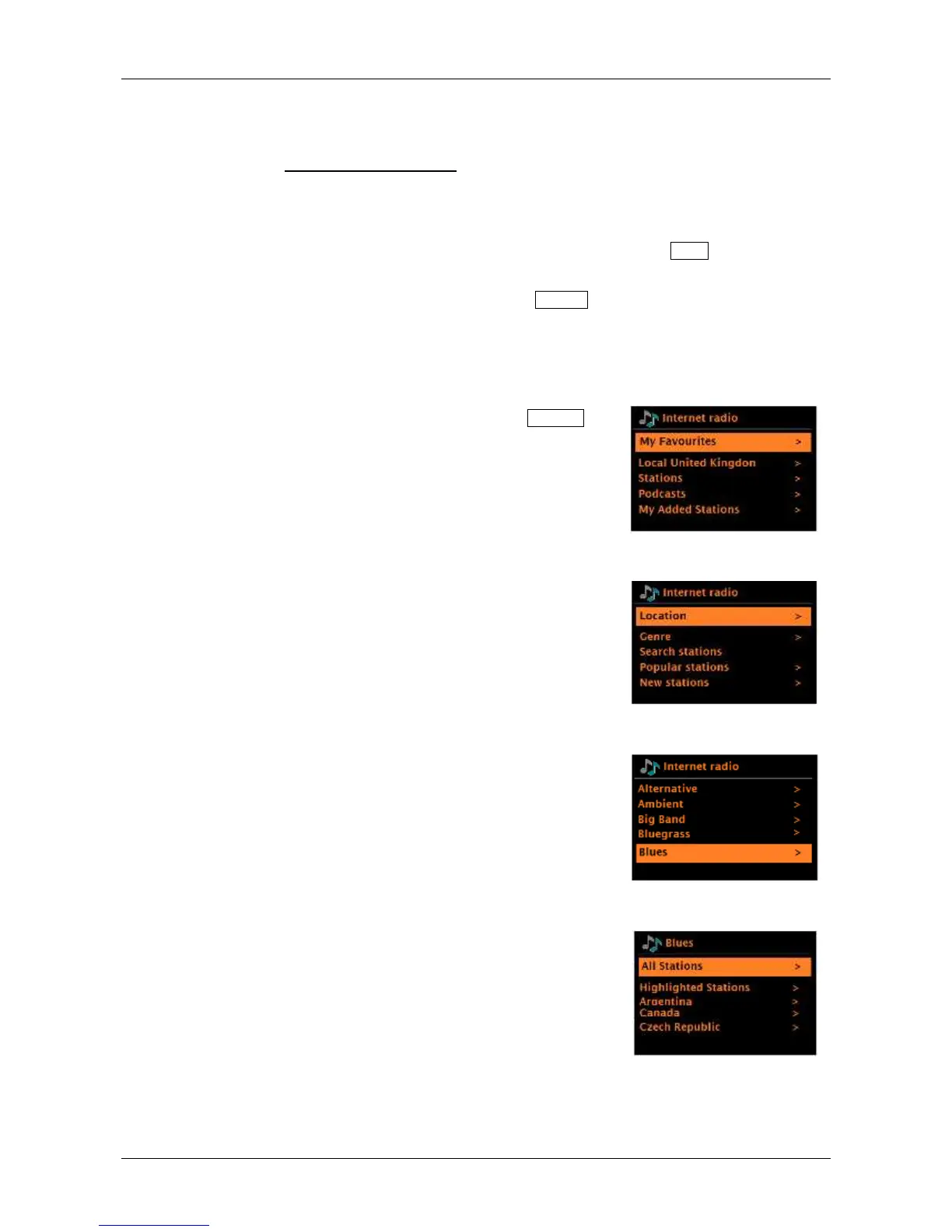
To browse Internet broadcasts, press and hold the Menu
knob > Station list >.
Browse through the menus to find appropriate broadcasts.
For example: Select Stations:


 To Next Page