19
K09657H02 | PROC-CAL/002/03 USER MANUAL | V. 11/07/2023
. SETTINGS
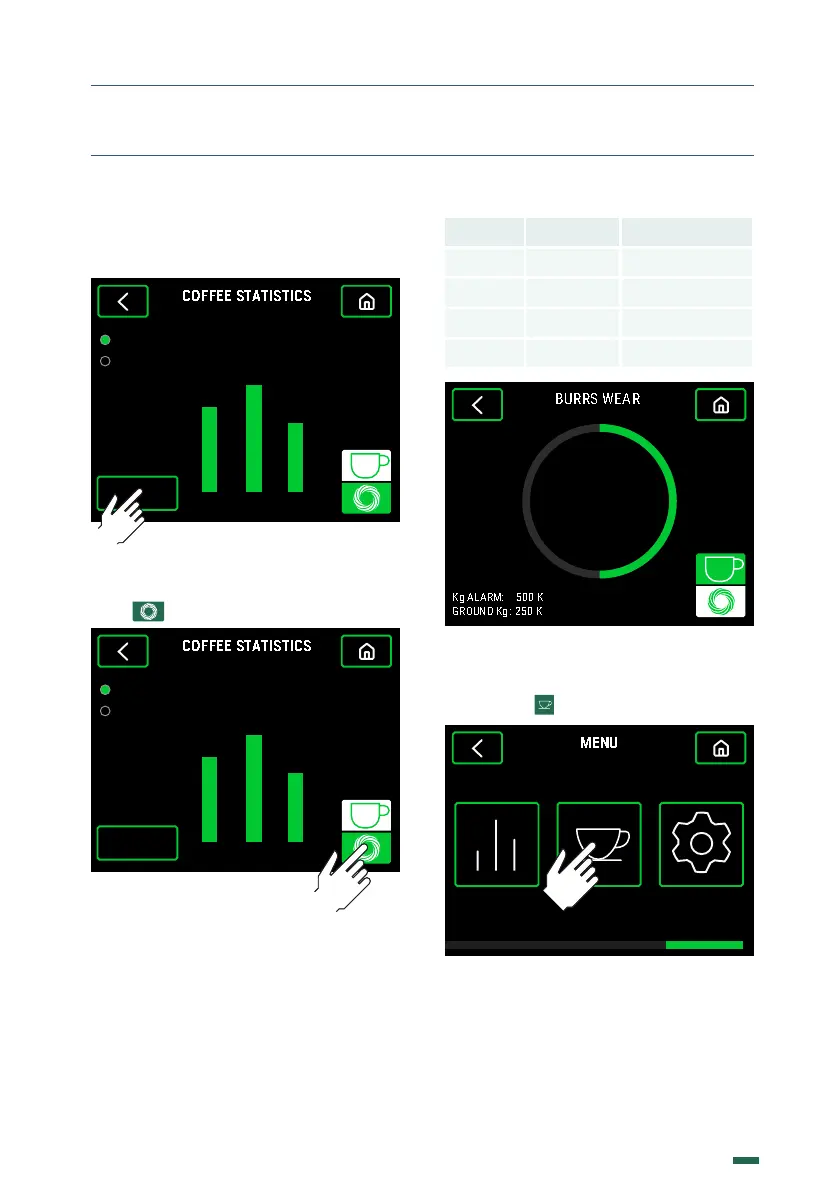
10.5.3. Relative Statistics can be reset by
pressing the Reset Relative button and then
entering the Password.
21 3
Relatives
Absoluts
5
4 3
RESET
Total:
12
10.5.4. To access the Burrs wear graph,
press
21 3
Relatives
Absoluts
5
4 3
RESET
Total:
12
10.5.5. There is a graphical view of the Burrs
wear in % as well as the Total ground Kg
and the Kg configured for the Burrs change
notice.
Model KG KG Red Speed
E5 400
-
E6 1.000 2.250
E8 1.200 5.000
E10 1.200 8.000
5 0
%
.. RECIPES
10.6.1. Press
SETTINGSSTATISTICS RECIPES
10.6.2 There are two options, the first one
will access the menu to configure the dose
times, the second will activate or deactivate
the Grinding Pause (by default it is active).


 To Next Page