16
K09657H02 | PROC-CAL/002/03 USER MANUAL | V. 11/07/2023
. SETTINGS
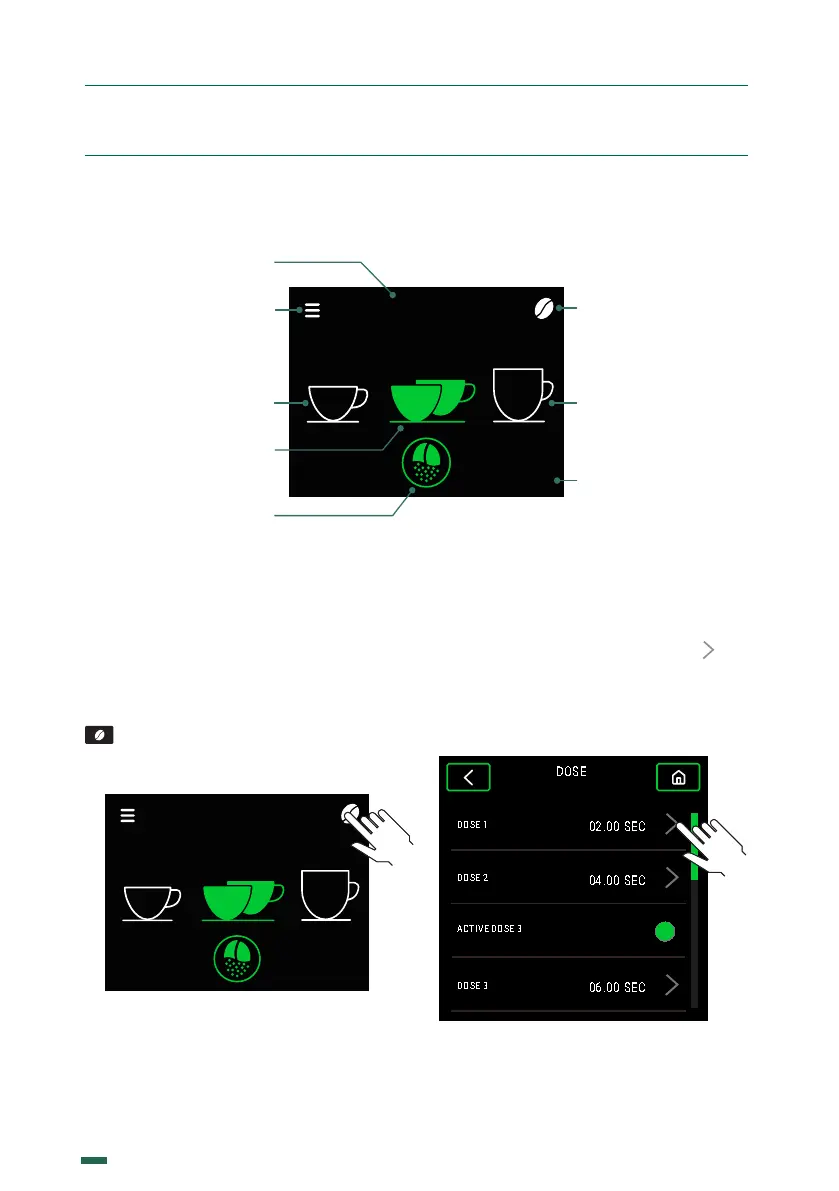
.. DISPLAY ICON GUIDE
.. GRIND TIME CONFIGURATIONS
10.2.1. The grinding times can be
configured for automatic, preselection and
instantaneous operation modes, and when
modified in one of the three modes they are
updated for all modes simultaneously.
To modify 1 dose, push the Coee Bean icon
of the Home menu and the dose time
menu will be accessed.
SELECT
SEC
1 2 3
E8 Ø83mm
10.2.2. Within the dose time menu you can
choose to change the time of 1, 2 or 3 doses
(if it is active), by pressing the symbol that
is in each of them, thus going to the dose
time configuration menu. To access dose
3, you must scroll down so that the option
appears.
* In the case of 3 dose activation
Grind button
Dose 3*
SELECT
SEC
04.00
1 2 3
E8 Ø83mm
Active
mode
Grind Time
Configuration
Time of
active dose
Menu
Configuration
Dose 1
Dose 2 active


 To Next Page