Hayetsira St. 17, Yokneam, Israel
Tel: +972-48-290-168 | Fax: +972-48-325-251 | www.fit-iot.com
M.2 cooling plate, SSD and modem
The M.2 cooling plate has several purposes:
• Allow installation of multiple form factor M.2 devices
• Provide cooling to M.2 devices
• Assist in battery placement
• Provide proper cable management inside fitlet3
M.2 Key-M accepts SATA of NVME modules, 2230, 2242, 2260 or 2280.
M.2 Key-B accepts SATA M.2 modules or modems, with lengths of 30mm, 42mm,
52mm or 60mm and widths 22mm or 30mm
The SSD has to be fastened to the M.2 cooling plate. Then the M.2 cooling
plate is then placed on the underside of the motherboard and fastened to
the front and back panel
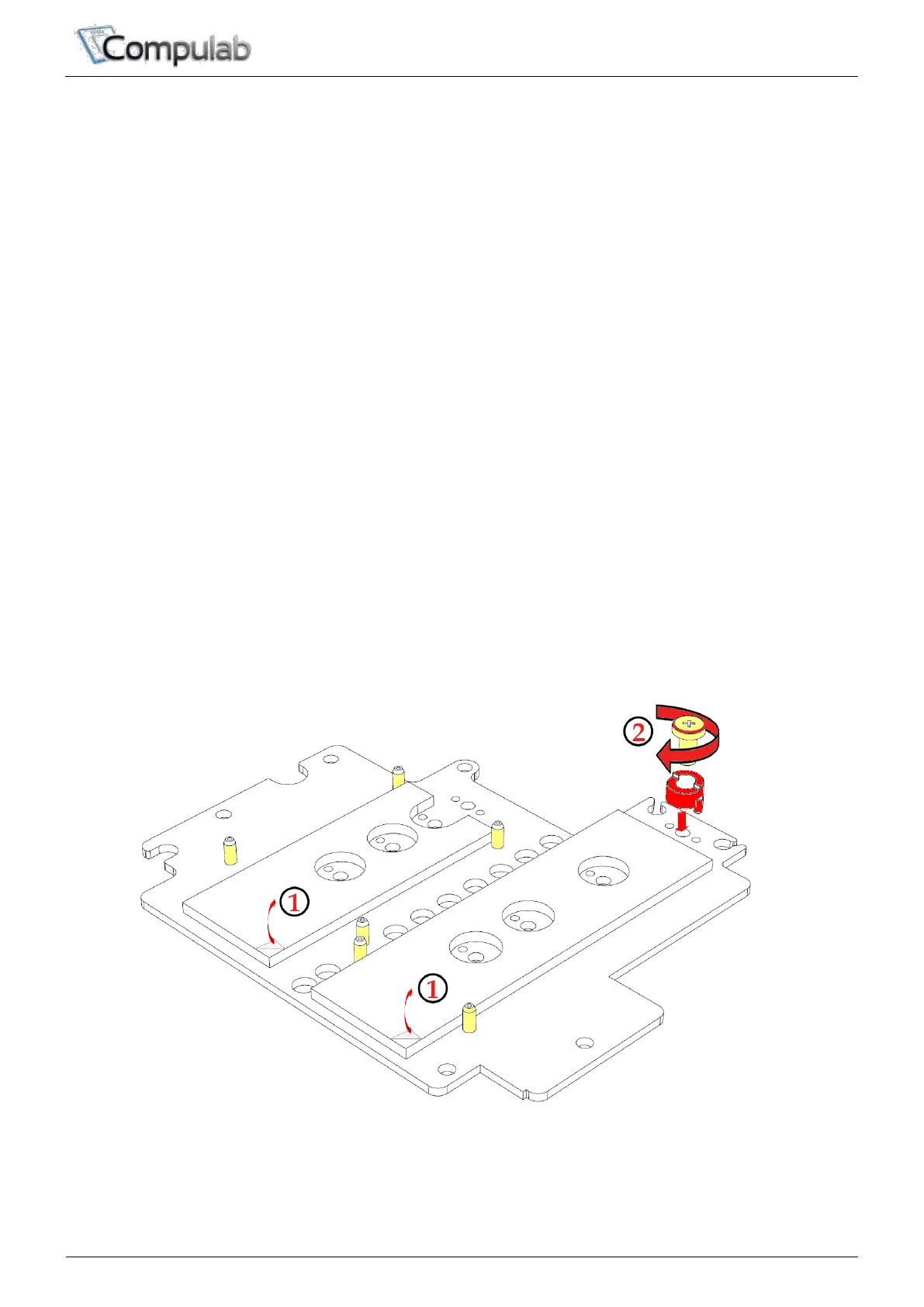
To install SSD onto M.2 cooling plate
1. Peel-off protective film from the two thermal pads.
2. Place the red M.2 spacer according to the length of the M.2 SSD as
depicted below. Note orientation of the spacer: The recessed side should
face the alignment screws. Insert M.2 fastening screw but do not tighten!


 To Next Page