- 45 -
Option Programming
1WAM4R, 1WFM4R, 1W900FM4R, and 1WSS4R
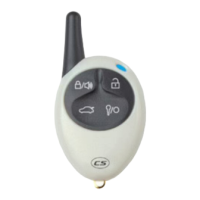
With lock and unlock on the same button.
1. Enter programming by pressing:
a. The (lock/unlock) button, and the (start/stop) button
simultaneously until the parking lights flash once. This is Menu 1.
b. The (lock/unlock) button, and the (query) button simultaneously
until the parking lights flash once. This is Menu 2.
2. Tap the (query) button the number of times equal to the option you
would like to change. For example, if it were the 5
th
option in the
menu that you would like to change, you would tap the (query) button
five times. The CompuStar system will flash the parking lights once
each time you tap the (query) button.
3. Wait a few seconds, and the parking lights will flash the number of
times corresponding to the option number you are about to modify. If
the number of times the lights flash does not correspond with the
option you want to change, wait a few seconds and the siren/horn will
sound, signaling that you have exited programming mode. After the
siren/horn sounds, you can retry the process from the beginning.
4. Immediately after the parking lights stop flashing from step 3, press:
a. The (lock/unlock) button for the factory default setting. The
parking lights will flash once.
b. The (start/stop) button for the optional setting. The parking
lights will flash twice.
You will need to perform these steps for each option you would like to change.
1WAM4R, 1WFM4R, 1W900FM4R, and 1WSS4R
With lock and unlock on separate buttons.
1. Enter programming by pressing:
a. The (lock) button, and the (unlock) button simultaneously until
the parking lights flash once. This is Menu 1.
b. The (lock) button, and the (start/stop) button simultaneously
until the parking lights flash once. This is Menu 2.
2. Press the (trunk) button and the (start/stop) button simultaneously until
the parking lights flash, the number of times equal to the option you
would like to change. For example, if it were the 5
th
option in the











 To Next Page