(MT series remote control intelligent turntable manual)3
24 Shenzhen Comxim Technologies Co., Ltd. Copyright 2015
Step3. The model stands in the center of the turntable, or will be displayed at the center of the
turntable.
Step4. You can also control the rotating direction, speed, and rotation mode of the rotary table
through the infrared remote control App Andriod. In order to increase the degree of participation
and interactive experience, you can let the audience through the remote control or App mobile
phone Andriod to control the required rotation.
10.2 Turntable with shutter function for 360 degree photography(only for
MT370BSL*Series and MT600BSL* Series)
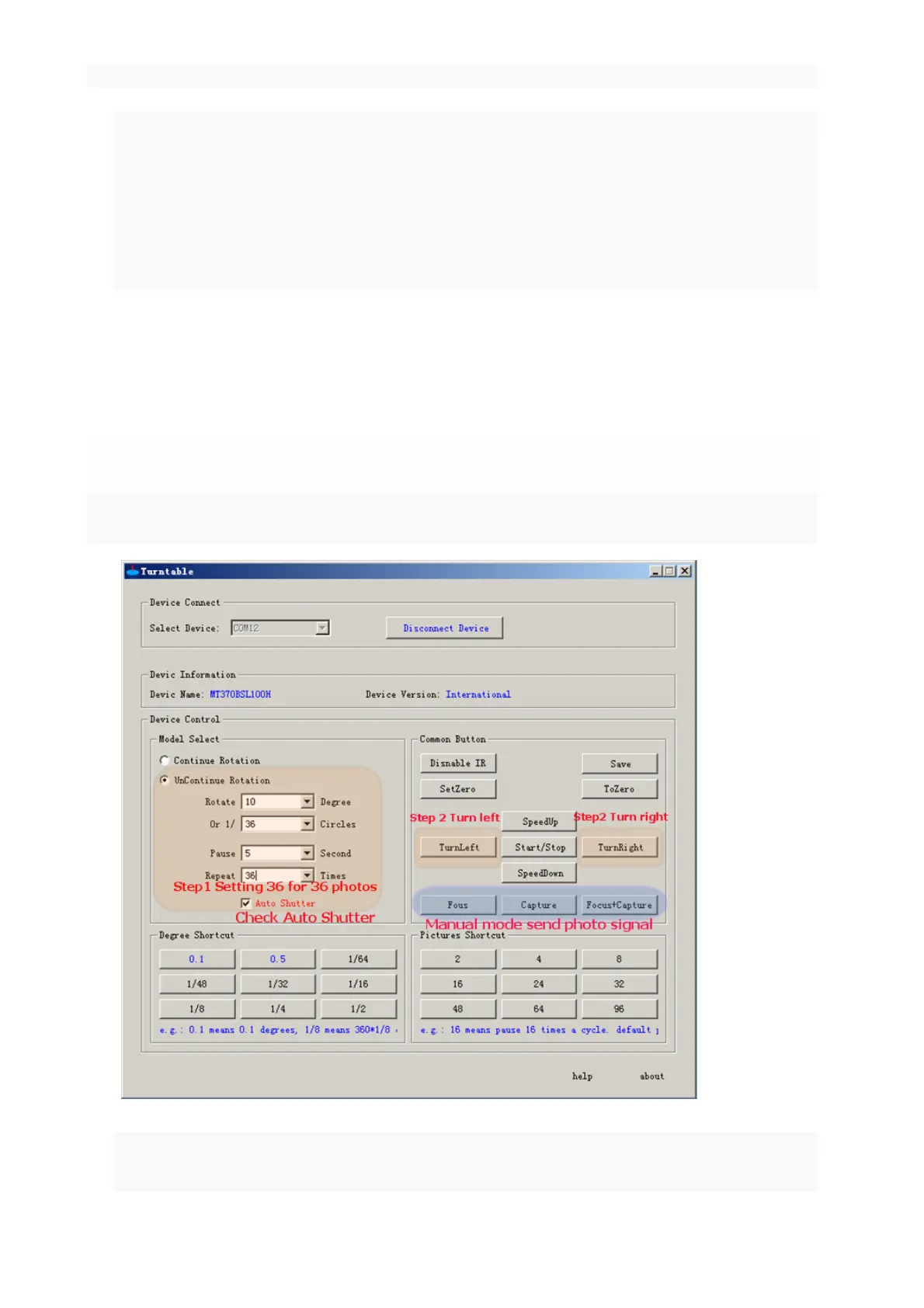
MT370BSLxx turntable can achieve the suspension, and the suspension of the time automatically send out the
shutter signal, control the camera to take pictures, to achieve timing, multi angle shooting.
Below is an example for 36 photos:
Step1. connection: select the appropriate shutter line, and use the shutter line connected to the smart
turntable and camera.



 To Next Page