8
PM5 Views
USB cable (optional)
to computer or
phone/tablet
Race system jacks (2)
Reset button
USB flash drive port
Battery cover
Bottom View of PM5
Back View of PM5
Sensor cable
to flywheel
PM5 Menu Map (Visit concept2.com/PM5 for more information.)
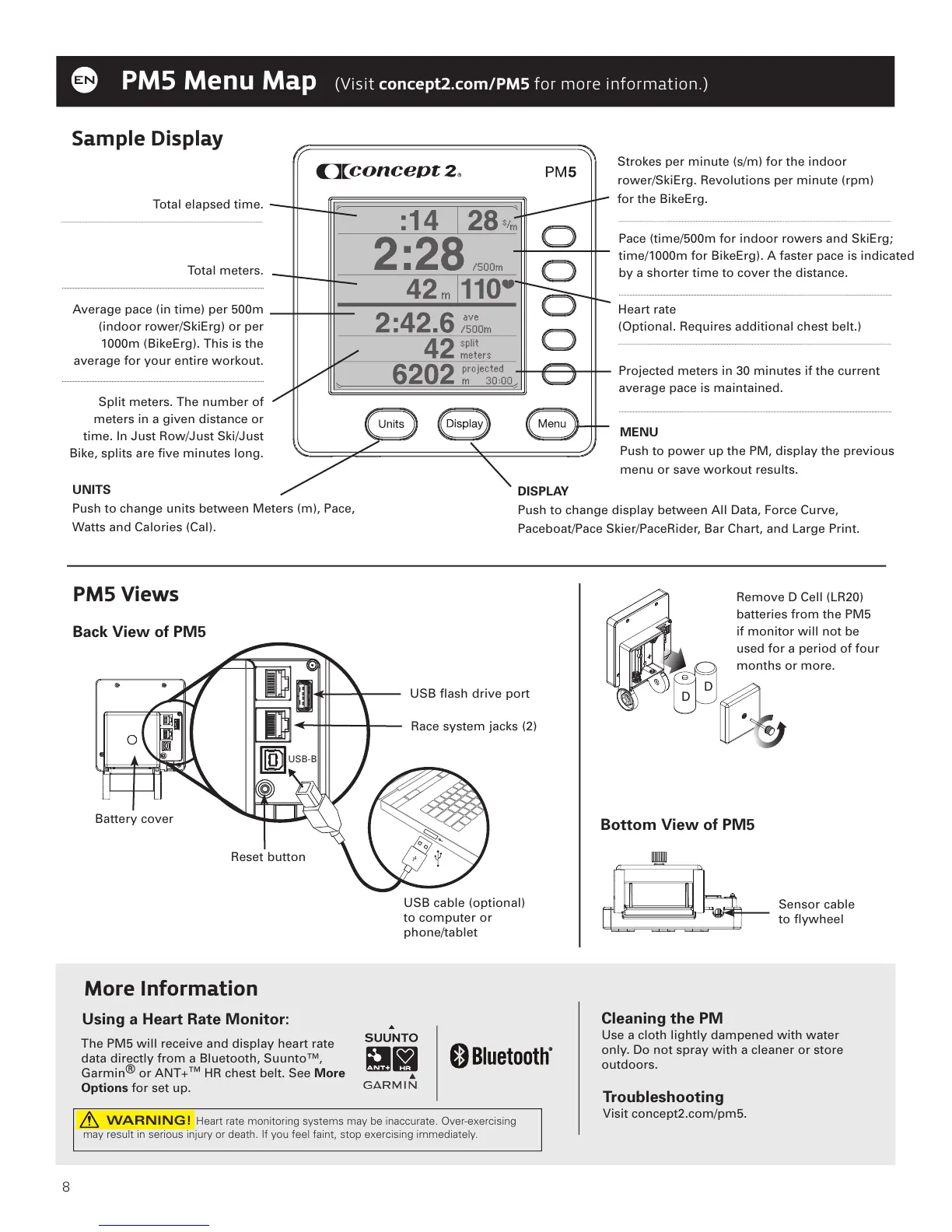
Total elapsed time.
More Information
Cleaning the PM
Use a cloth lightly dampened with water
only. Do not spray with a cleaner or store
outdoors.
Troubleshooting
Visit concept2.com/pm5.
Using a Heart Rate Monitor:
Memory
Strokes per minute (s/m) for the indoor
rower/SkiErg. Revolutions per minute (rpm)
for the BikeErg.
Pace (time/500m for indoor rowers and SkiErg;
time/1000m for BikeErg). A faster pace is indicated
by a shorter time to cover the distance.
Total meters.
Heart rate
(Optional. Requires additional chest belt.)
Average pace (in time) per 500m
(indoor rower/SkiErg) or per
1000m (BikeErg). This is the
average for your entire workout.
Projected meters in 30 minutes if the current
average pace is maintained.
Split meters. The number of
meters in a given distance or
time. In Just Row/Just Ski/Just
Bike, splits are five minutes long.
Sample Display
Remove D Cell (LR20)
batteries from the PM5
if monitor will not be
used for a period of four
months or more.
D
D
The PM5 will receive and display heart rate
data directly from a Bluetooth, Suunto™,
Garmin
®
or ANT+
™
HR chest belt. See More
Options for set up.
WARNING! Heart rate monitoring systems may be inaccurate. Over-exercising
may result in serious injury or death. If you feel faint, stop exercising immediately.
USB-B
UNITS
Push to change units between Meters (m), Pace,
Watts and Calories (Cal).
DISPLAY
Push to change display between All Data, Force Curve,
Paceboat/Pace Skier/PaceRider, Bar Chart, and Large Print.
MENU
Push to power up the PM, display the previous
menu or save workout results.



 To Next Page