5 / 16
7. Playback
There are two methods for you to play the video files recorded on the hard disk.
1. In the desktop shortcut menu.
2. Main Menu>Record>Playback.
Enter the playback interface – the device allows playback of multiple channels at the same
time.
Note: The hard disk that saves the video files must be set as read-write or read-only state.
(refer to 4.5.1 HARD DISK management)
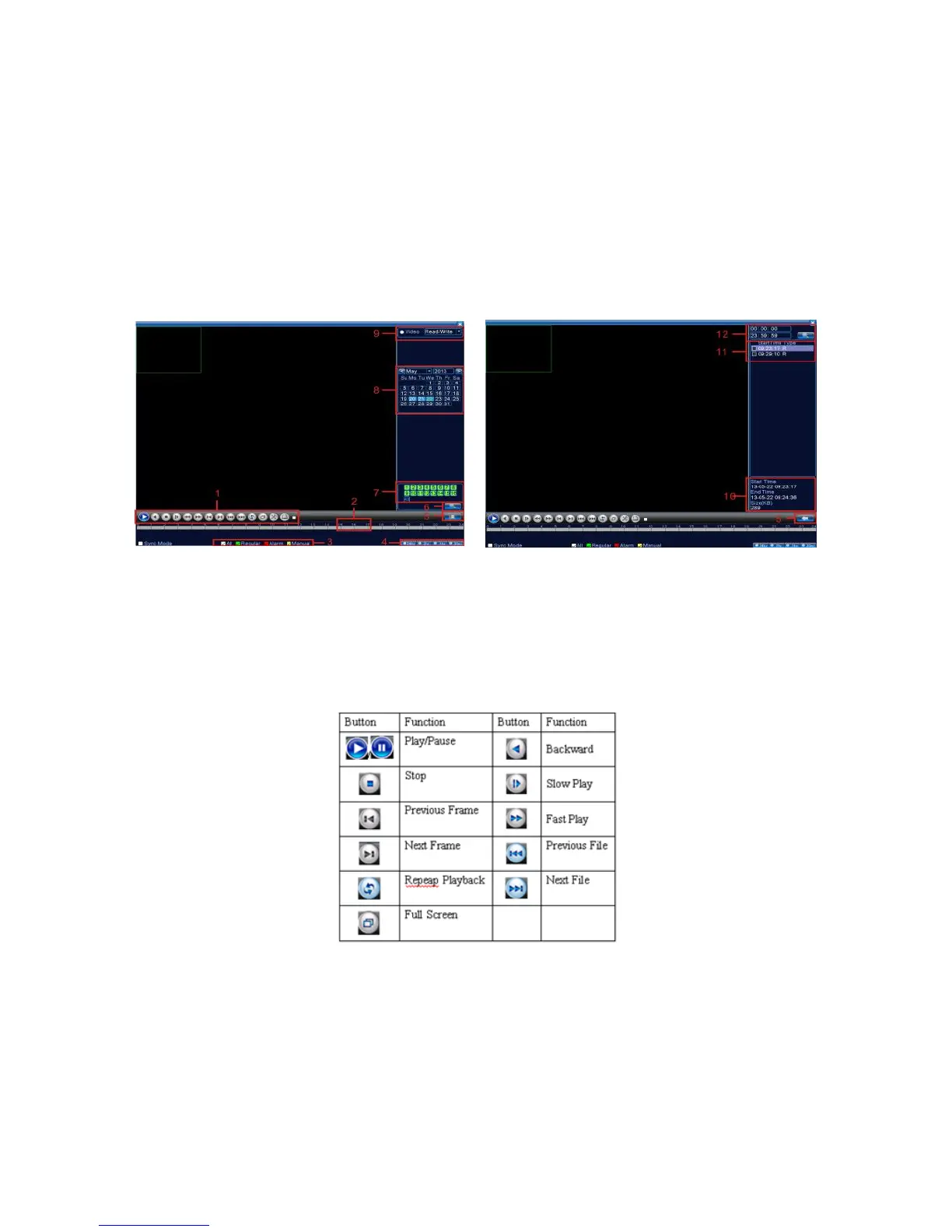
Pic 4: Playback
1.Playback control
2.Operating Tips 3. Record type 4.
Time progress bar options
5.Switching time or file mode 6.File Search 7.Channel option 8.Date option
9.Storage Device option 10.File information 11.File Option 12.Time
【
File information
】
Start time, end time and size.
【
File option
】
Choose the file to playback/backup.
【
playback control
】
Refer to the following sheet for more information.
Table2 Playback control key
Note: Frame by frame playback is only performed in the "pause" playback state.
Special functions:
Partial enlarged: viewing single pictures in full-screen playback mode, the user can use the left
mouse button box to choose any size area on the screen, then by clicking the left mouse button, the
selected area will enlarge. Double click the left mouse button to exit the partially enlarged image.
Note: If the current resolution of one channel is beyond maximum resolution, it will be displayed
as a red “X” when playback is attempted.



 To Next Page