22
【Starting IP】Display IP address started section
【Ending IP】Display IP address end segments
【Add】On the basis of the need for added
【Delete】According to the need to delete
4.4 System Setup
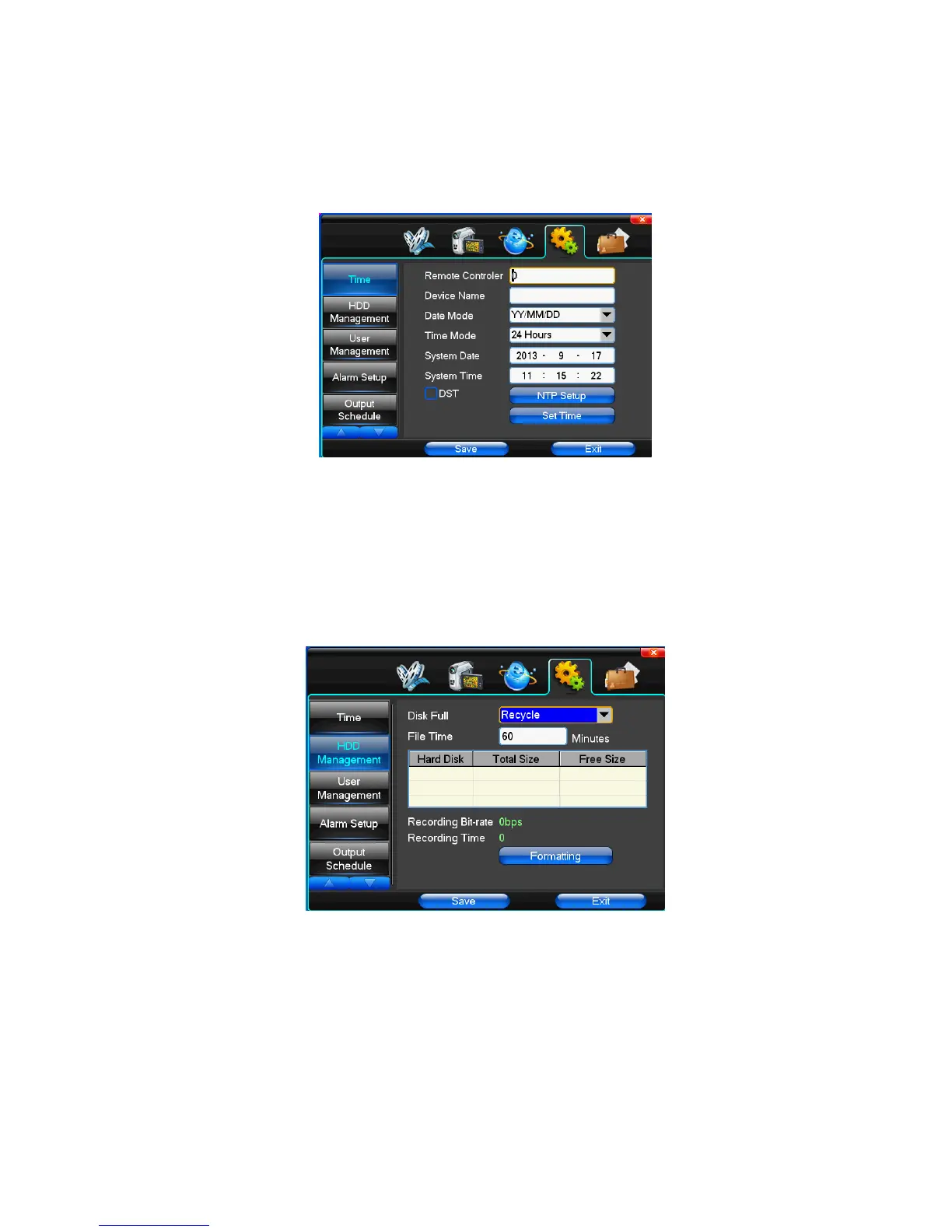
(1)Time
【System Language】Used in a remote remote device control more hard disk video recorder occasions, only in remote controls address and hard disk video recorder
Numbers identical to remote operation.
【Device Number】According to the requirement to select the time zones, has twenty six time zone for user Settings.
【Time Zone】Select the format the date is displayed in including date, sun and moon June 21 years in three formats.
【Date Mode】To choose time display modes include 24-hour system and 12 hours to make
【System Date】The current system date
【System Time】The current system time
【Daylight-saving mode】According to the requirement to choose
【Set Time】Confirm modification system of time
(2)HDD Management
【Disk Full】When video disk full system how to deal with, "said system will be automatic coverage the earliest video files continue covering video," stop video "says
system to stop the current video.
【File Time】Says automatic generation video files interval, the set range 5-120 minutes.
【Recording Bit-rate】Said the total rate of current coding
【Recording Time】Said the storage devices systems installed in accordance with the current bitrate can store video of time.
Display the current hard disk attributes: types, hard disk, usable capacity total capacity. Click [formatting ], all storage file will be lost.
Tip: to format the hard disk before please stop system current all those videos.
(3)User Management



 To Next Page