EasyManua.ls Logo

Condor DRW876 - Remote Control Layout and Functions; Control Interface Overview; Remote Control Battery Installation

Condor DRW876
28 pages
Print Icon
To Next Page IconTo Next Page
To Previous Page IconTo Previous Page
Loading...
9
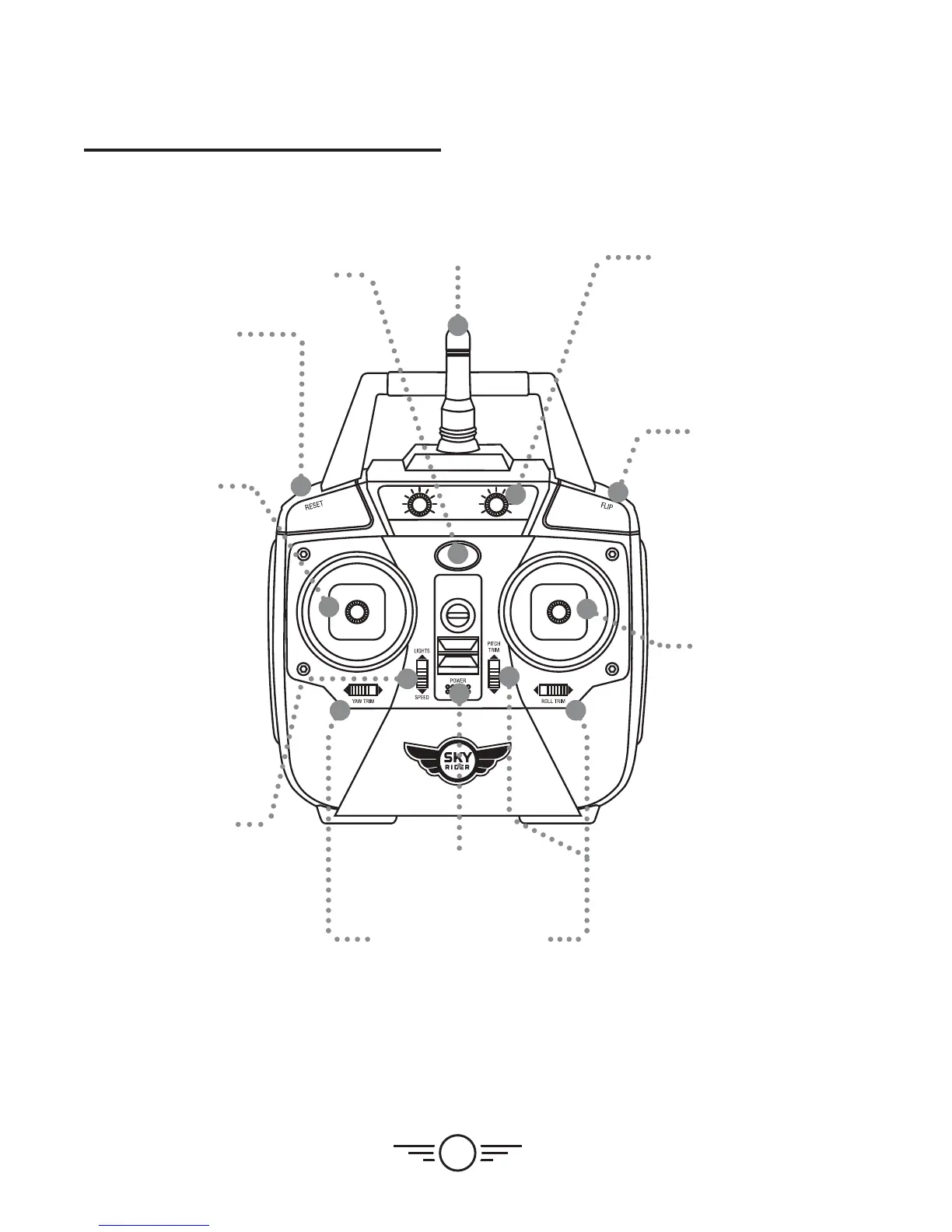
Layout & Functions
Left Control
Stick
Increase
Throttle:
push forward
Decrease
Throttle:
push backward
Yaw/Spin:
push left or right
Factory Reset
Press to reset remote
trim settings.
Right
Control
Stick
Pitch:
push forward/
backward
Roll/Bank:
push left/right
Flip
Press and hold,
then push
Right Control
Stick in any
direction to
perform a flip.
Camera Controls
Left dial:
up/down tracking
Right dial:
left/right tacking
Lights/Speed
Push forward to turn
lights ON or OFF.
Push downward to
adjusts speed setting.
Trim Adjustment
Adjusts trim settings for
smooth and level flight.
Power
Switch
Antenna
Power/Status Indicator
Remote Control