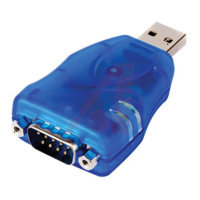
USB to Serial Converters Manual
Version 2.0
Document Reference No.: CP_000032 Clearance No.: CP#022
Copyright © Connective Peripherals Pte Ltd 5
2 Specifications
2.1 Standard
Features
• Internal Transmit and Receive buffers
• Requires no IRQ, DMA, I/O port
• DB-9 male serial connectors (terminal blocks on some models) (see Note 1)
• LEDs for each port indicate TxD and RxD
• Virtual COM port drivers available
o Windows 7 up to Windows 10
o MAC OSX 10.9 onwards
o Linux Kernel 3.0.0-19 (e.g. (Ubuntu version 11.10)
o Other legacy drivers available from the FTDI website
USB to RS-232 Features (available on ES-U-1xxx and ES-U-30xx)
• Adds RS-232 ports via USB connection
• RS-232 data signals : DCD, RxD, TxD, DTR, GND, DSR, RTS, CTS, RI (See Note 2)
USB to RS-422/RS-485 Features (available on ES-U-20xx and ES-U-30xx) (See Note 3)
• Adds RS-422 / RS-485 ports via USB connection
• Auto transmit buffer control for 2-wire RS-485 half-duplex operation
• Internal termination and bias resistors on some models (enabled by jumper)
• RS-422 data signals : TX-, TX+, RX+, RX-, GND, RTS-, RTS+, CTS+, CTS- (see Note 2)
• RS-485 signals (half duplex) : Data+, Data-, GND
• RS-485 signals (full-duplex) : TX-, TX+, RX-, RX+, GND
Additional Opto-isolation Features (available on ES-U-11xx and ES-U-21xx)
• Each RS-232 or RS-422/RS-485 port is individually isolated with 2000 volt DC optical isolation
• Each RS-232 or RS-422/RS-485 port is individually protected by a surge protector to withstand
electrostatic discharge and power surges up to 25KV ESD
Note 1 ES-U-1032-RM has RJ45 ports which can be converted to DB-9 male if required using the supplied cables
Note 2 Terminal block has subset of these signals only – see section 6 for details
ES-U-2101-MB also features RS232 but only a subset of these signals – see section 6 for details
Note 3 Support multiple serial protocols - Jumpers or DIP switches are used to select the required serial protocol


 To Next Page