44
12. WLAN Configuration
This section only refers to the “3G Wireless Router Mode”, “Wireless Router Mode
(Gateway)” and “Wireless AP Mode” operating modes.
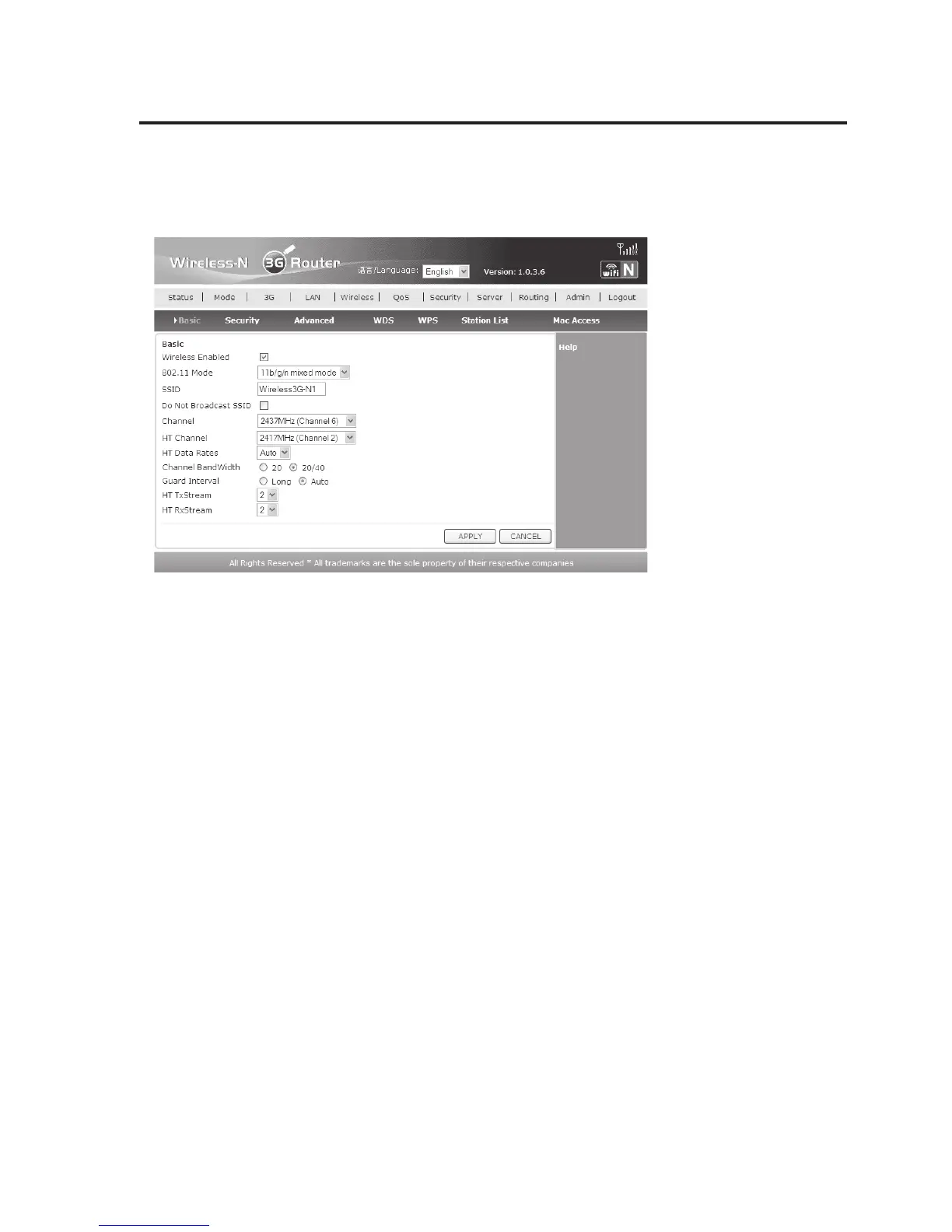
• First click “Wireless” in the top bar. Now the page “Basic” is displayed.
• Most settings are already correctly made. If desired, you can change the “SSID” here. Simply
enter a new name in the field.
You may also have to adjust the settings of your WLAN channel. Select the desired channel
in the drop-down menu behind “Channel”.
• Click “APPLY” to save the settings.
If you changed the “SSID” previously, close the web browser now and connect the computer
to the new WLAN network.
Then you can log onto the webinterface again. If you changed only the channel, click
“RETURN” after a few seconds.
• Now click “Wireless” and then “Security”.


 To Next Page