EasyManua.ls Logo

Contax Tvs III - Page 24

Contax Tvs III
67 pages
Print Icon
To Next Page IconTo Next Page
To Previous Page IconTo Previous Page
Loading...
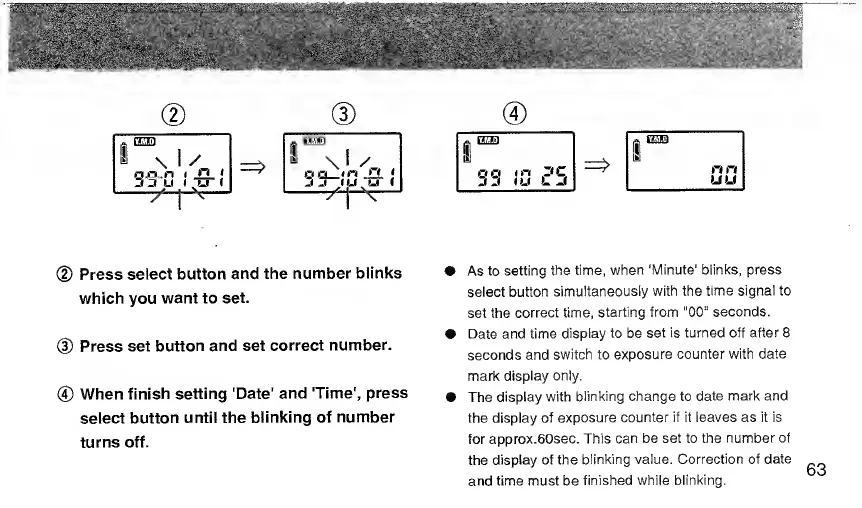
(
3
)
(D
Press
select
button
and
the
number
blinks
which
you
want
to
set.
(D
Press
set
button
and
set
correct
number.
®
When
finish
setting
'Date'
and
'Time',
press
seiect
button
untii
the
biinking
of
number
turns
off.
|0|
1
o
O
*
f"*
P
C.
n
ri
(u
L
I
nri
LIU
As
to
setting
the
time,
when
'Minute'
blinks,
press
select
button
simultaneously
with
the
time
signal
to
set
the
correct
time,
starting
from
"00“
seconds.
Date
and
time
display
to
be
set
is
turned
off
after
8
seconds
and
switch
to
exposure
counter
with
date
mark
display
only.
The
display
with
blinking
change
to
date
mark
and
the
display
of
exposure
counter
if
it
leaves
as
it
is
for
approx.eOsec.
This
can
be
set
to
the
number
of
the
display
of
the
blinking
value.
Correction
of
date
and
time
must
be
finished
while
blinking.
63

Related product manuals