EasyManua.ls Logo

Contax Tvs III - Page 25

Contax Tvs III
67 pages
Print Icon
To Next Page IconTo Next Page
To Previous Page IconTo Previous Page
Loading...
<Printing
the
Date
and
Time>
This
camera
can
print
date
or
time
automatically
while
taking
pictures.
@
Press
the
date
button
and
choose
the
date
mode.
Each
time
you
press
the
date
button,
the
dating
mode
switches
in
the
following
order:
(No
printing)
=>
Month-Day-Year.
=>
Day-Month-Year
=>
Year-
Month-Day
=>
Day-Hour-Minute.
Set
your
desired
mode,
Setting
date
and
time
display
disappears
after
appox.8
sec.
and
switches
to
exposure
counter
with
date
mark
display
only.
Press
the
date
button
if
you
desire
to
check
the
contents
of
printing.
(D
Depress
the
shutter
release
button
to
shoot
and
date
or
time
will
print.
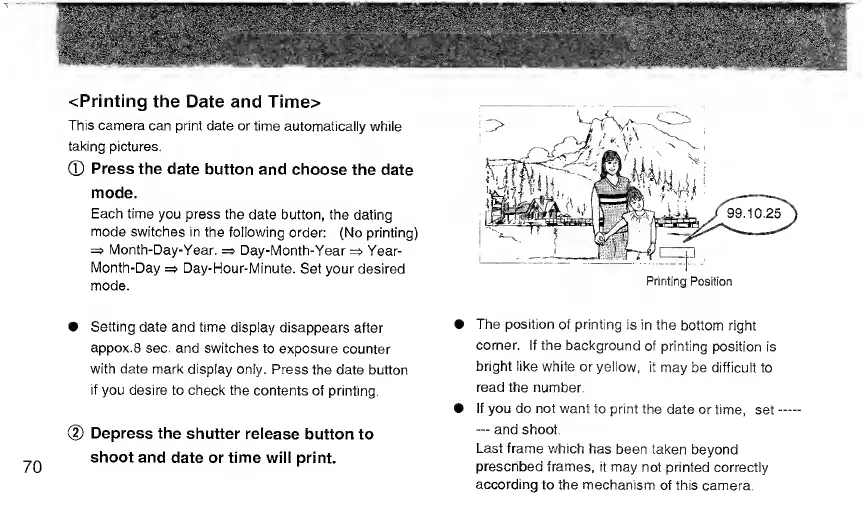
The
position
of
printing
is
in
the
bottom
right
corner.
If
the
background
of
printing
position
is
bright
like
white
or
yellow,
it
may
be
difficult
to
read
the
number.
If
you
do
not
want
to
print
the
date
or
time,
set
and
shoot.
Last
frame
which
has
been
taken
beyond
prescribed
frames,
it
may
not
printed
correctly
according
to
the
mechanism
of
this
camera.

Related product manuals