EasyManua.ls Logo

Contax Tvs III - Page 56

Contax Tvs III
67 pages
Print Icon
To Next Page IconTo Next Page
To Previous Page IconTo Previous Page
Loading...
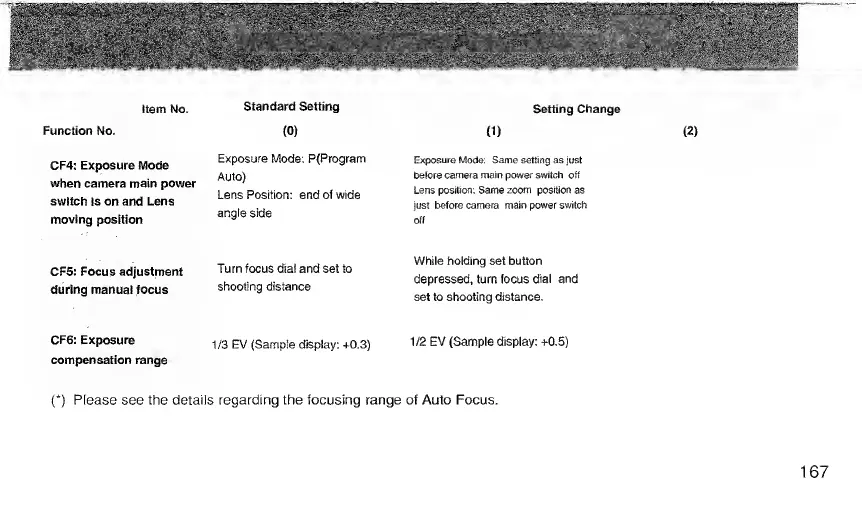
Setting
Change
Item
No.
Function
No.
CF4:
Exposure
Mode
when
camera
main
power
switch
is
on
and
Lens
moving
position
CF5:
Focus
adjustment
during
manual
focus
CF6:
Exposure
compensation
range
Standard
Setting
(0)
Exposure
Mode;
P(Program
Auto)
Lens
Position:
end
of
wide
angle
side
Turn
focus
dial
and
set
to
shooting
distance
1/3
EV
(Sample
display:
+0.3)
0
)
Exposure
Mode;
Same
setting
as
just
belore
camera
main
power
switch
off
Lens
positton;
Same
zoom
position
as
just
before
camera
main
power
switch
off
While
holding
set
button
depressed,
turn
focus
dial
and
set
to
shooting
distance.
1/2
EV
(Sample
display:
+0.5)
(*)
Please
see
the
details
regarding
the
focusing
range
of
Auto
Focus.

Related product manuals