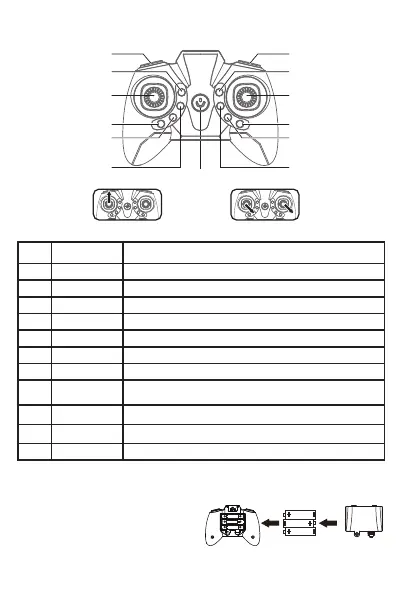
REMOTE CONTROL BATTERY INSTALLATION
REMOTE CONTROL FUNCTIONS
Serial
Number
1
Function keys /
Names
Speed Switch
Adjust the speed.
2
3D Roll Click to active the 3D roll function.
Click once to power on the remote control and click again to turn off the remote control.
Power ON / OFF
If the drone drift forward (backward) without any operation, press the trim button
backward (forward) correspondingly, it can make the drone more stable.
Forward / backward
trim
If the drone drift to left (right), press right (left) trim correspondingly, make the drone
stable.
Left / right Trim
Click to switch the light of the drone; long press for 3 seconds to enter one-key rotation, the drone
rotates in the middle point, long press again to exit the function.
Light switch /
One key rotation
3
4
5
8-9
6-7
Click to active Headless Mode; Long press for 3 seconds to active one key return function.
Headless mode /
One key return
Ascend / descend, turn left / right.
Direction stick Forward / backward / left and right side flying.
Throttle stick
Click to takeoff or landing.
One key take-off /
landing
10
11
12
13
Short press this key to active the obstacle avoidance mode. The aircraft is equipped with obstacle
avoidance detection head in front / back / left / right, which can detect the surrounding obstacles
to prevent collision damage.
One key avoidance
Function / Effect
Push up the throttle to unlock Gyro calibration
1. Remove the battery cover from the back of
controller (Fig. A).
2. Install 3 x AAA batteries into the controller,
make sure to install batteries to their correct
polarity. (Fig. B).
Do not mix old and new batteries or battery types.
3. Replace the battery cover.
Fig.A Fig.B
3 x AAA Batteries (Not Included)
13. Power on / off
6. Forward fine-tuning
7. backward fine-tuning
2. 3D Roll
4. Throttle stick
(ascend / descend/
turn left / turn right)
5. Direction stick
(forward / backward /
left and right side flying)
8. Right fly fine-tuning
9. Left fly fine-tuning
11. One key take-off / landing
10. One key avoidance
12. Headless mode
(Short press)
One key return (Long press)
1. Speed switch
3. Light switch
(Short press)
One key rotation (Long press)



 To Next Page