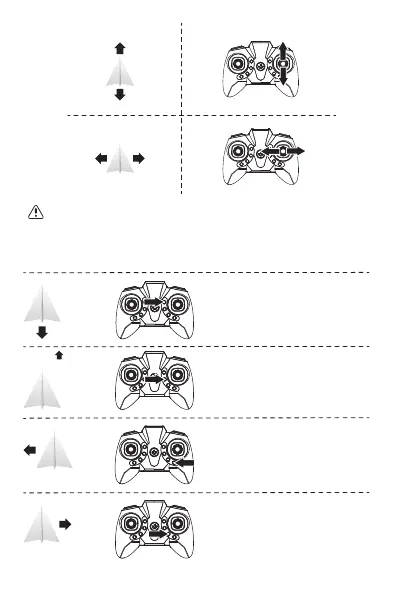
5. Trimming Function
When the drone spins in the air or tilts in different directions, you can use trimming function to correct
the action.
If the drone moves backward while hovering,
press the forward trimming button, until the drone
stops moving backward.
If the drone moves forward while hovering, press
the backward trimming button, until the drone stops
moving forward.
If the drone drifts to the left while hovering, press
the right sideward trimming button, until the drone
stops drifting to the left.
If the drone drifts to the right while hovering, press
the left sideward trimming button, until the drone
stops drifting to the right.
Note: When the drone is 30cm from the ground, the drone will become unstable due to the
airflow below. The closer it is to the ground, the greater the impact.



 To Next Page