7. Switch Speed
The obstacle avoidance mode is turned on by default at takeoff, and the speed is the lowest gear. If you
need to switch the speed, you need to turn off the obstacle avoidance mode. Press the speed switch button
to switch the speed, different speed gear has different beeps : “Di~” is the low speed mode, “Di~Di~” is the
medium speed mode, and “Di~Di~Di” is the high speed mode.
Light Switch
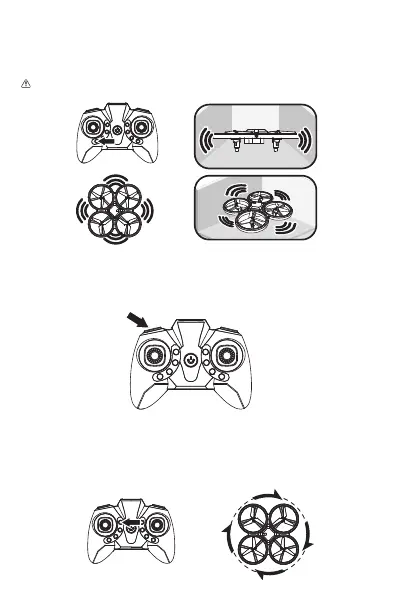
Click the light switch / one-key rotation button, the lights of drone will automatically switch to another
mode.
One Key Rotation
Long press the light switch / one-key rotation button, and the drone will rotates with itself as the midpoint.
8. Light Switch & One Key Rotation
6.Obstacle Avoidance Mode
Press the obstacle avoidance button to turn on the bostacle avoidance mode, press again to turn off (Fig.5).
The obstacle avoidance mode is turned on by default at takeoff.
Avoid obstacles on four sides and when an obstacle is detected, the drone will retreat to a safe distance.
When the drone turns on the obstacle avoidance mode, the fast gear cannot be turned on. Therefore, it is
recommended to fly indoors when the obstacle avoidance mode in turned on.
Note: Under sunlight or bright light, glass or reflective objects, black objects, the effect of obstacle
avoidance will become worse or even will fail.



 To Next Page