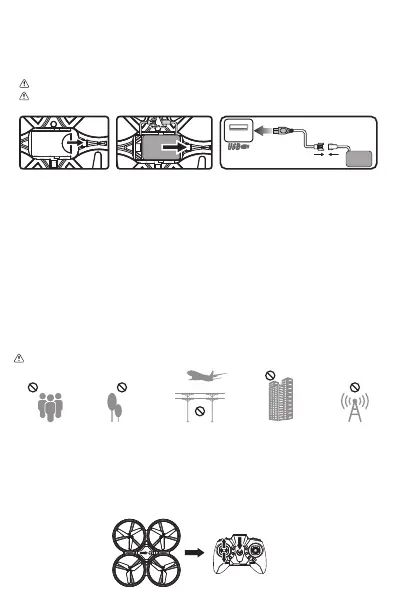
1. Use only the original factory cable. Do not use damaged or cable of other brands.
2. Do not leave the battery aside when charging.
3. Do not overcharge the battery. When the battery is fully charged, unplug the device.
4. Do not charge the battery immediately after it has become hot.
5. Do not leave the battery in the fire in consideration of safety.
6. Do not short circuit the battery. Do not leave the battery together with tiny medal parts in consideration of
safety.
7. The drone needs to take out the battery when not in use and store it at 80% to extend battery life. Keep
the battery in a cool place to avoid exposure.
Attention:
FLIGHT SAFETY
Please choose an empty room or outdoor environment with no rain or snow, wind less than level 4. Please
stay away from people, trees, power lines, tall buildings, airports and signal towers.
FLIGHT
1. Remote Control Connection
Note: The flight time is about 8 minutes, the flight distance is up to 60 meters, and the charging time is
about 60-90 minutes.
1. Install the aircraft battery and remote control battery, turn on the power switch of the aircraft, and keep
the aircraft on a horizontal plane after flashing.
2. Turn on the remote control power switch, push the remote control throttle stick up and down, the light of
the drone becomes steady, and the remote control is connected successfully.
Note: Steps need to be followed to prevent poor handling problems.
3.DRONE LITHIUM BATTERY CHARGING INSTRUCTIONSCHARGE THE BATTERY
Low-battery warning: When the battery power is low, the light of drone will flash slowly. It needs to
fly back immediately.
Note: Please fully charge the battery before flying.
1. First remove the lithium battery from the drone battery compartment (Fig.C).
2. Disconnect the power link of the plug (Fig.D).
3. Connect the USB charging cable to the corresponding socket. The light turns on when charging and
turns off when it is fully charged. Charging time is about 60-90 minutes (Fig.E).
Fig.D
Fig.E
USB
BATTERY
Fig.C



 To Next Page