44 45
FEATURES
C
ONTOUR
®
NEXT ONE blood glucose monitoring system
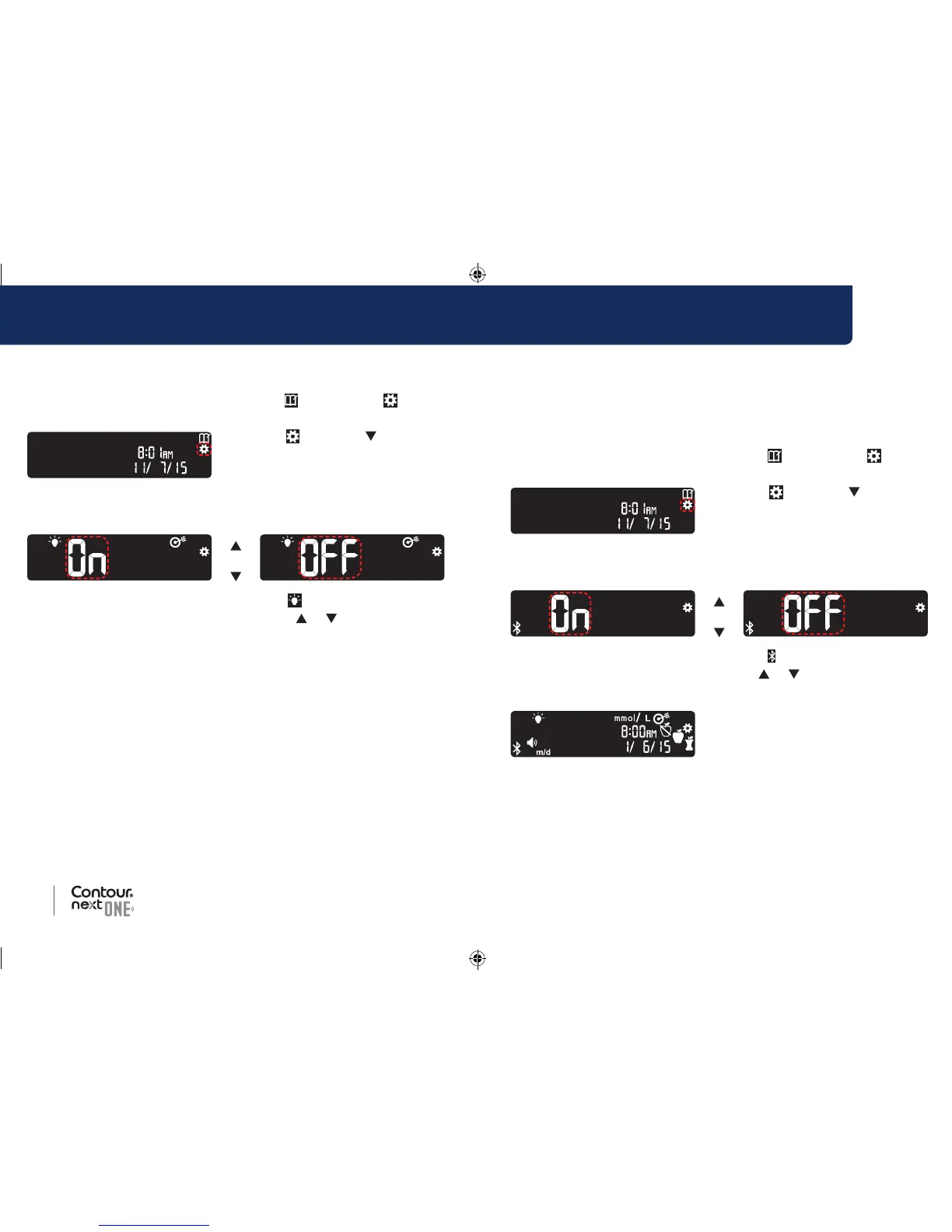
If your meter is not ON:
1. Press and hold the OK button until the meter turns on.
The Home screen has 2 options: Logbook
and Settings .
2. To highlight the Settings
symbol
, press the button.
3. When the Settings symbol is
blinking, press the OK button to
enter Settings.
4. Continue to press the OK button until you see the Target
Lights screen.
or
Target Light Symbol:
5. To turn Target Lights On or Off, press the or button to display
the option you want.
6. Press the OK button.
Set Bluetooth
Bluetooth is not available until you pair your meter with a mobile
device. After pairing, the Bluetooth setting is turned ON.
If your meter is not ON:
1. Press and hold the OK button until the meter turns on.
The Home screen has 2 options: Logbook
and Settings .
2. To highlight the Settings
symbol
, press the button.
3. When the Settings symbol is
blinking, press the OK button to
enter Settings.
4. Continue to press the OK button until you see the
Bluetooth screen.
or
Bluetooth Symbol:
5. To turn Bluetooth On or Off, press the or button to display the
option you want.
6. Press the OK button. The meter
briefly displays your saved
settings, then beeps and returns
to the Home screen.
85096877_CntrNxtONE_UG_EN.indd 44-45 9/21/16 3:47 AM



 To Next Page