Connections
CoolMasterNet PRM Rev 0.7
9
www.coolautomation.com
© 2017 CoolAutomation
4.3
RS232 Port
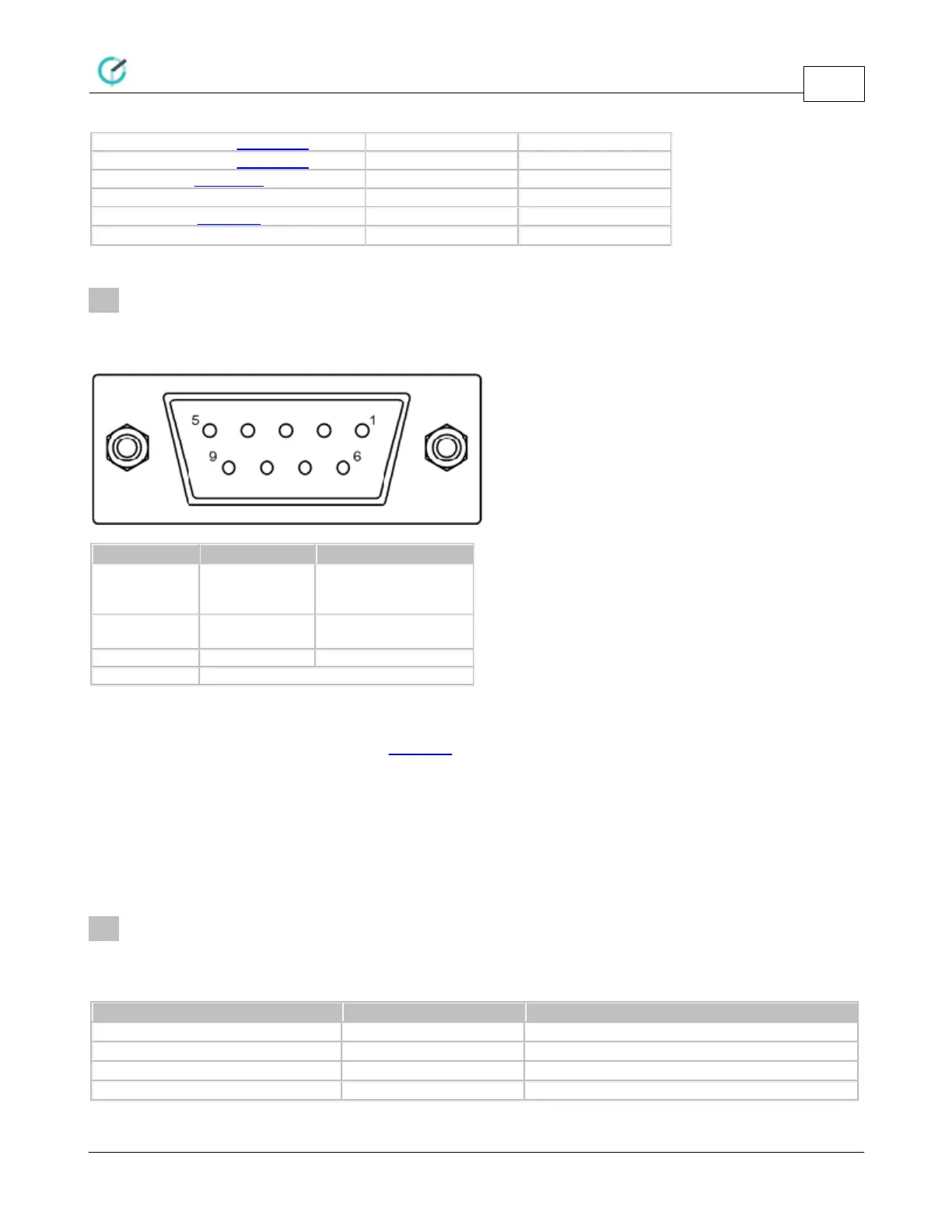
RS232 Interface on CoolMasterNet is available from the RS232 DB9 female connector. Below is a DB9
connector front view and signals table.
TxD (Data from
CoolMasterNet to DTE
)
RxD (Data from DTE to
CoolMasterNet)
Gender and pinouts of the RS232 cable supplied with CoolMasterNet are suitable for connection to PC RS232
port directly or via standard RS232 to USB adapter. Maximal length of the RS232 Cable should not exceed 25m.
By default RS232 Interface is dedicated for ASCII I/F. The default CoolMasterNet RS232 Port settings are:
4.4
Ethernet
CoolMasterNet incorporates an IEEE 802.3 compatible 10/100 Mb/s Ethernet port supported via RJ45
connector. Below are main port features.
Max Ethernet Cable Length
Supported Ethernet Protocols
Protocol Auto-Negotiation


 To Next Page