18
COOLIUS A10 / Y10
5.1 Refrigerant weight scale
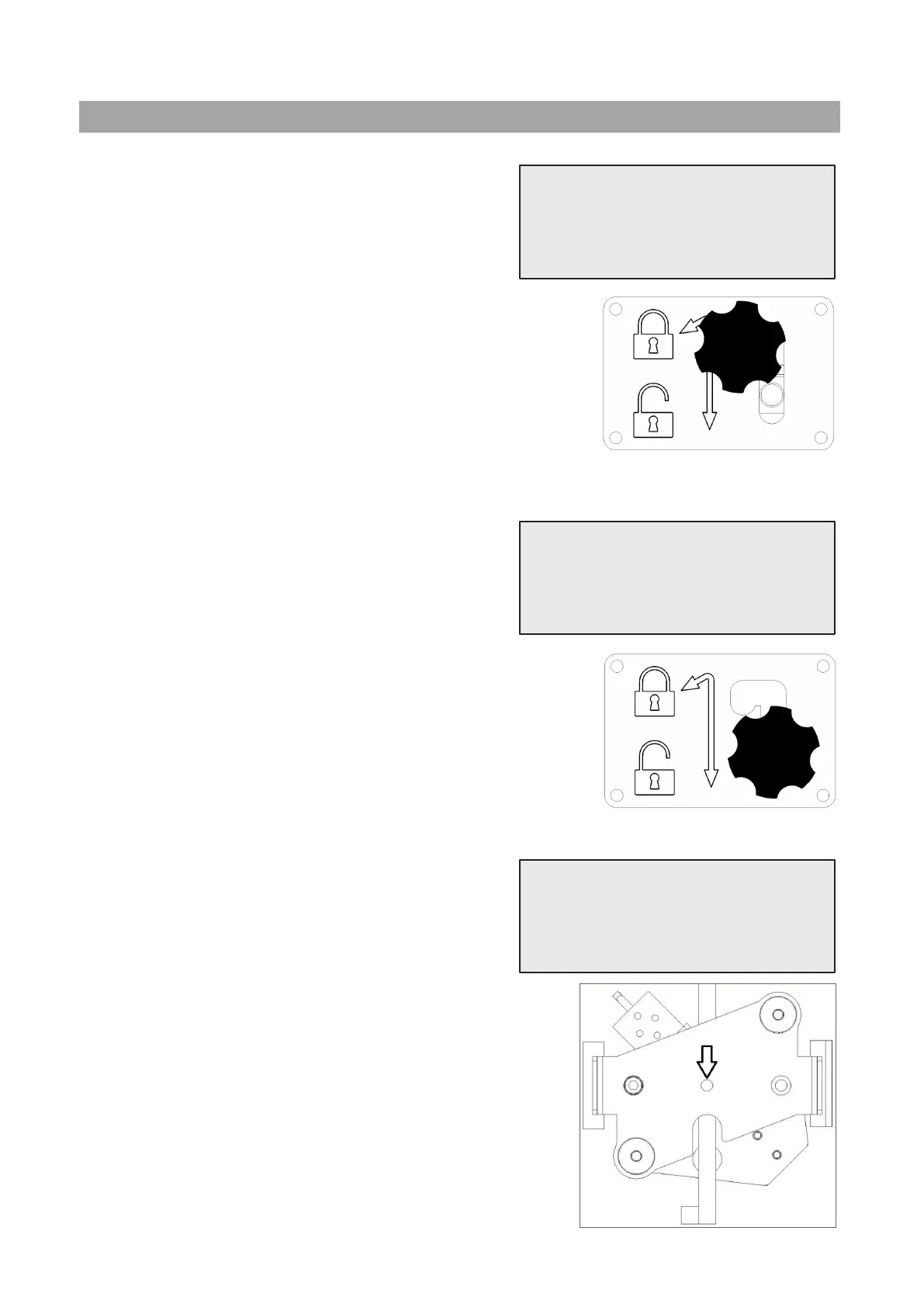
Unload the weight scale
1. Unload the scale by moving the star grip screw of the
transport lock to “safety position” (lift the knob and move
it to the left).
2. When done, press ENTERkeytoconrmandwait!
Load the weight scale
3. Load the scale by moving the star grip screw of the
transport lock back to the “working position” (move the
knob slightly up and to the right, then fully down)).
4. When done, wait a few seconds then press ENTERkeytoconrm
and wait for screen change!
Place the sample weight
5. Dismount the top cover (remove the 4 screws).
6. Place a sample weight (minimum 1 kg, suggested 2 kg) on the
center of the scale bracket (as shown in the picture).
7. When done, wait a few seconds then press ENTERkeytoconrm
and wait for screen change!
Unload weight scale
(safety position)
Safety position
Load weight scale
(Working position)
Working position
Place the sample
weight on the scale.



 To Next Page