10
1010
10 M750 and M800 Installation Instructions 497139 Issue 3
Note: If you are in any doubt regarding connection
Note: If you are in any doubt regarding connectionNote: If you are in any doubt regarding connection
Note: If you are in any doubt regarding connection
to the telephone network, seek advice from a
to the telephone network, seek advice from ato the telephone network, seek advice from a
to the telephone network, seek advice from a
competent telephone engineer. If you are using the
competent telephone engineer. If you are using thecompetent telephone engineer. If you are using the
competent telephone engineer. If you are using the
PSTN terminal block, the wiring should be carried
PSTN terminal block, the wiring should be carriedPSTN terminal block, the wiring should be carried
PSTN terminal block, the wiring should be carried
out by an installer authorised by the network
out by an installer authorised by the networkout by an installer authorised by the network
out by an installer authorised by the network
supplier (e.g. British Telecom).
supplier (e.g. British Telecom).supplier (e.g. British Telecom).
supplier (e.g. British Telecom).
Approved Usage
Approved UsageApproved Usage
Approved Usage
This product is manufactured to meet all European
Economic Area telecommunication networks
requirements. The equipment has been tested and
conforms to ETSI TBR 21 and the associated ATAAB
Advisory Notes.
In the event of problems, first check to confirm the
functionality of the line, then contact your equipment
supplier/installer.
The built-in modem has been approved for the
following usage:
• Automatic call initialisation and dialling.
• Operation in absence of proceed indication.
• Modem.
• Serial connection.
• Multiple repeat attempts.
• Line Status Monitoring.
Usage other than approved usage or failure to
comply with the instructions may invalidate any
approval given to the apparatus, if, as a result, the
apparatus ceases to comply with the standards
against which approval was granted.
Digital Communicator Outputs
("6" in Figure 2.)
The control panel provide 16 programmable outputs,
which could be used to operate a digital
communicator – a device that transmits the status of
each channel to an Alarm Receiving Centre (where
each channel could represent a zone alarm status).
Alternatively, low-power devices such as LEDs could
be switched on or off by these outputs (see Figure 9).
By default, each output is switched negative, i.e.
normally at +12Vdc and switches to 0V when active.
When at 0V, up to 100mA can flow into the output
from an external source.
If required, the sense can be reversed during system
configuration, i.e. normally at +0V and switches to
12Vdc when active. In this case, when switching to
+12Vdc, each output can deliver up to 5mA to an
external load.
The terminal block labelled "16" in Figure 2 can
provide a +12Vdc supply to a digital communicator.
If this used, the digital communicator must be
housed within the control panel, since the +12Vdc
output is unfused.
Transistor Outputs
("7" in Figure 2.)
The programmable transistor outputs provide control
for external equipment such as LEDs, buzzers and
relays. The following outputs are provided:
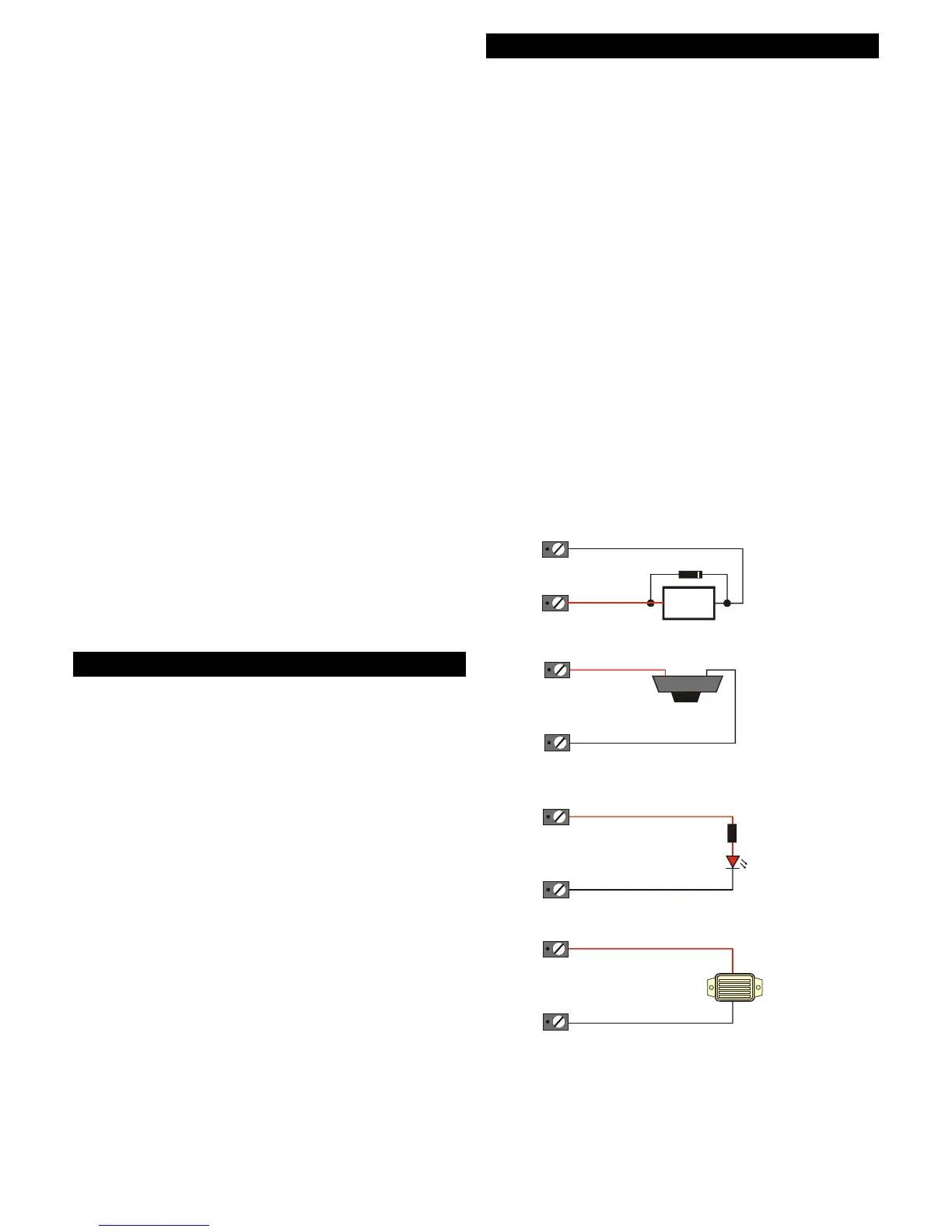
• One switched-negative output (-3). This can switch
from 12Vdc to 0V on activation, and is able sink
up to 500mA from a 12Vdc source. See Figure 9
for examples.
• One switched-positive output (+4). This switches
from 0V to 12Vdc on activation, and can deliver
up to 500mA to an external load. See Figure 10
for examples.
Each output can be programmed to activate when,
for example:
• There is an alarm in a specified zone.
• There is a panic alarm.
• Mains is disconnected from the control panel.
• A specified user passcode is entered.
• A combination of specified conditions occur.
The Engineering Manual provides full details of output
programming.
Relay
Smoke
Detector
Relay available from
RS components
P/No. 351-982.
Capable of switching
mains voltages
+ 12 V
Aux 12 V
-ve O/P
(Programmed as Alarm / Bell / etc)
(Programmed as Detector Reset)
12V Buzzer
RS Part No. 245-051
1K0 Ohm Resistor
LED (Light Emitting Diode)
-Ve O/P
-Ve O/P
-Ve O/P
Aux 12V
Aux 12V
Aux 12V
0V
Diode (IN4001)
Figure 9: Examples of using Switched-Negative Outputs



 To Next Page