12
1212
12 M750 and M800 Installation Instructions 497139 Issue 3
Communicator Line Fault
Communicator Line FaultCommunicator Line Fault
Communicator Line Fault
If a standalone communicator, such as a RedCARE
STU, is being used, connect the Line Fault output of
the communicator to the LINE FLT input of the panel.
The communicator must provide +12Vdc to indicate
a line fault (e.g. if the Line Fault output at the
communicator uses a relay, connect the common
terminal of the relay to +12Vdc and the normally-
open terminal to the LINE FLT input of the panel).
If the communicator is dual-path (i.e. has landline
and mobile communication), you also need to
connect a panel output programmed as type "ATS
Test" to the ATS Test input of the communicator. Invert
the sense of the output at the panel if a "positive
applied" input sense is used at the communicator.
The panel generates an "ATE L.F. Single" alert if only
one of the networks is not available, or "ATE L.F. All" if
both networks are not available. For a single-path
communicator, a line fault generates "ATE L.F. Single".
Remote Reset Input
("12" in Figure 2.)
For alarms that require an engineer or remote reset,
the system can also be reset by applying 0Vdc to the
REM RST input terminal. This can be achieved by
routing 0V from terminal block "16" (Figure 2) through
a switch to the REM RST input.
This input could be connected to the "Control" output
from a RedCARE Subscribed Terminal Unit (STU) to
enable the central station to provide a "Remote
Reset" facility.
Extension Loudspeaker Connections
("13" in Figure 2.)
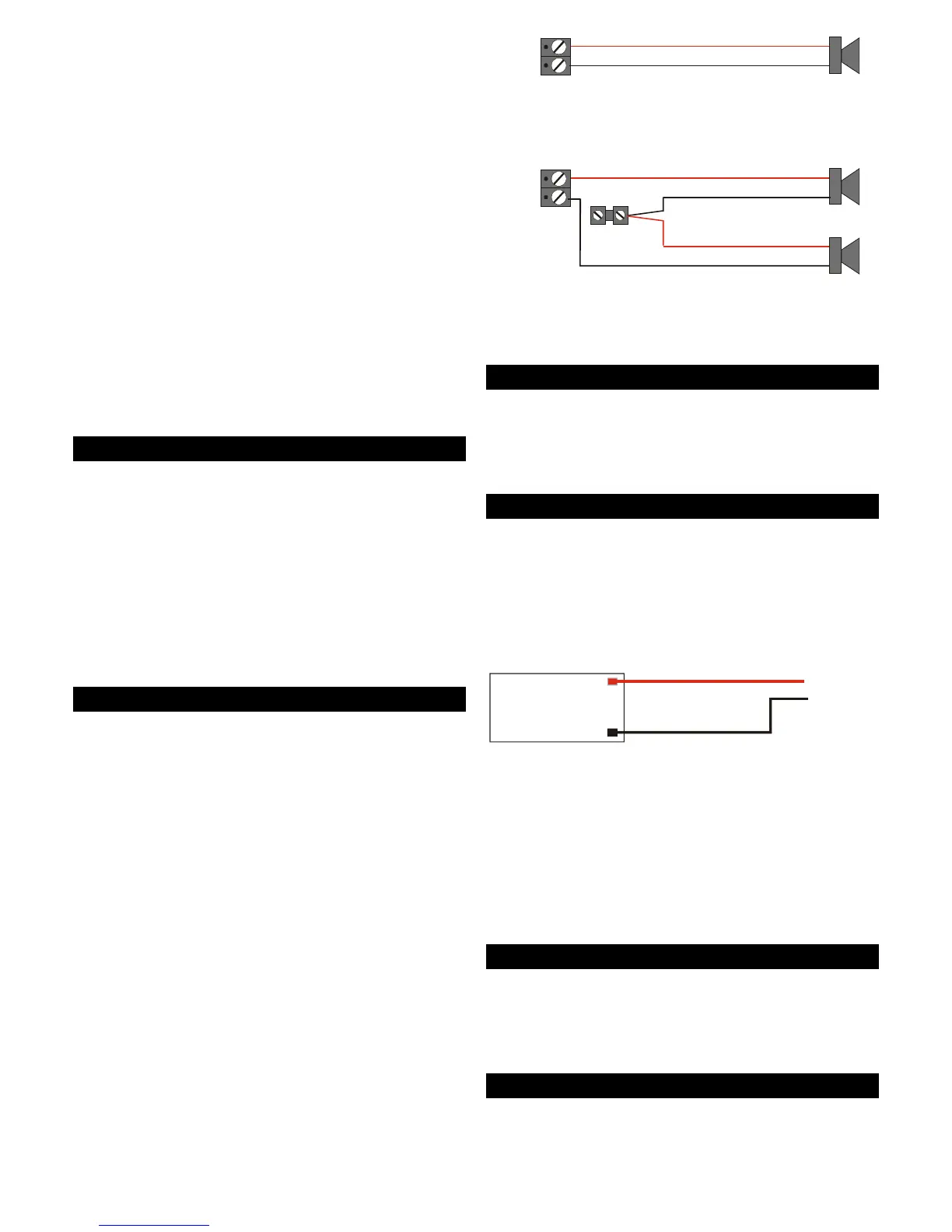
An extension loudspeaker can be connected to the
SPKR terminals of the control panel. Connection
details are shown in Figure 13.
The speaker output is designed to drive up to two
16Ω loudspeakers. However, when using two
speakers, you must wire them in series to reduce
current consumption.
Each loudspeaker output can also be programmed
to one or more wards so that the sounder only
operates under the relevant conditions.
Note: Extension loudspeakers MUST NOT be wired in
Note: Extension loudspeakers MUST NOT be wired inNote: Extension loudspeakers MUST NOT be wired in
Note: Extension loudspeakers MUST NOT be wired in
the same cable as used for network or zone wiring.
the same cable as used for network or zone wiring.the same cable as used for network or zone wiring.
the same cable as used for network or zone wiring.
1 x 16 Ohm Loudspeaker
2 x 16 Ohm Loudspeakers
SPE
KER
SPEAKER
+
+
0V
0V
Figure 13: Extension Loudspeaker Connections
AC Input Connector
("14" in Figure 2.)
The two outer terminals of the AC IN connector
connect to the 17VAC output from the mains
transformer.
Battery Connector
("15" in Figure 2.)
Note: Do not connect the battery until all other
Note: Do not connect the battery until all otherNote: Do not connect the battery until all other
Note: Do not connect the battery until all other
wiring has been completed.
wiring has been completed.wiring has been completed.
wiring has been completed.
The BATT terminals are for connection to a +12Vdc
standby battery. A battery lead is provided in the
spares pack (red wire to "+").
+
-
12V 17Ah Battery
+
_
Control Panel
battery terminals
Figure 14: Battery Connections
If the mains power to the control panel fails, the
standby battery will take over and maintain the
system. In order to safeguard the battery from full
discharge, the control panel automatically isolates
the standby battery when its voltage falls below 9.5V.
When the mains power is restored, the system will
power-up and continue to recharge.
12Vdc Auxiliary Power Terminals
("16" in Figure 2.)
You can use the terminal block in the bottom-left
corner of the control panel PCB to power devices
such as PIR detectors. The terminals provide 12Vdc.
Back Tamper Connector
("17" in Figure 2.)
The BACK TAMPER connector should be wired to the
"back tamper switch", which is mounted on a plate



 To Next Page