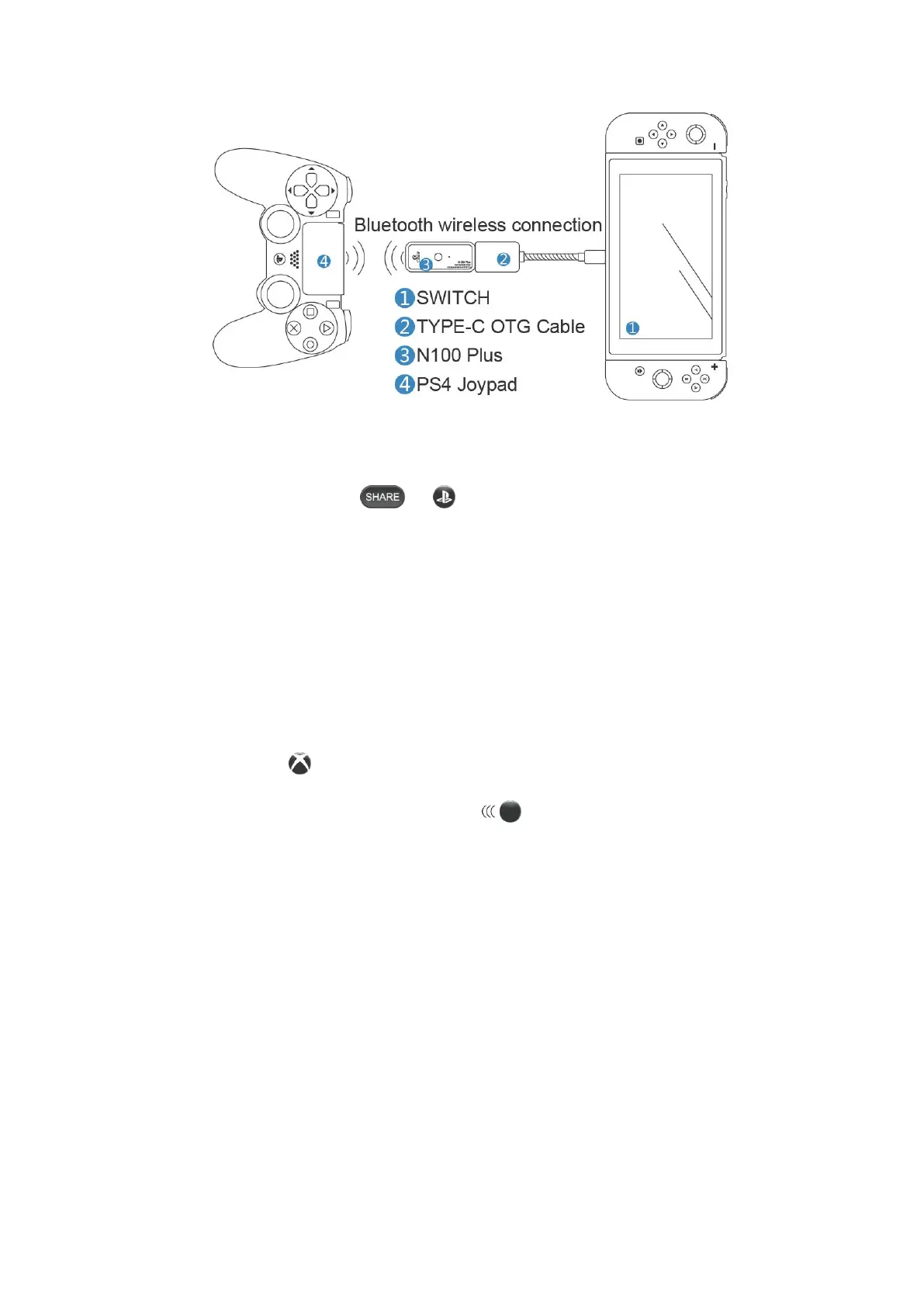
PS4 Joypad to connect to Bluetooth pairing:
1. The PS4 Joypad is in the off state.
2. Press and hold the Joypad“ + ”button until the Joypad indicator light flashes
(search for Bluetooth).
3. Connect the N100 Plus to the Switch host according to the diagram. Press the pairing
button and the indicator light flashes double (Search for Bluetooth).
4, wait 3-5 seconds or so, the Joypad indicator light is purple, N100 Plus indicator is
always on, the game display shows that the Joypad is connected successfully and a
"USB" prompt appears, the connection is successful.
X1S Joypad to connect to Bluetooth pairing:
1. The X1S Joypad is in the off state.
2. Press the Joypad“ ”button.
3. Press and hold the Joypad sync button“ ”button until the Joypad indicator
flashes quickly. (search for Bluetooth).
4. Connect the N100 Plus to the Switch host according to the diagram. Press the pairing
button and the indicator light flashes double (Search for Bluetooth).
5. wait 3-5 seconds or so, the Joypad indicator light is always on, the N100 Plus indicator
is always on, the game display shows that the Joypad is connected successfully and a
"USB" prompt appears, the connection is successful.


 To Next Page