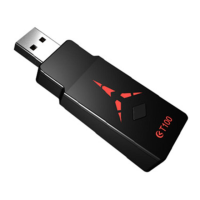
a. the first set of configuration features default, only use the handle conversion function.
b. the second group for the jet fighter 2, opened the burst function, open a one-button big
move function.
c. the third group for the blade of the different degrees 2, open one-click continuous
strokes and button locks, used to brush reputation, etc.
d. other games
G
、
Calibration function
The calibration function can solve the problem of rocker drift on part of the handles without
increasing the dead zone.
1.Calibration:
a. Press the PS4 button / X1 button / NS Pro button + PS4 button /
X1 button / NS Pro button at the same time and release to enter the calibration
configuration mode.
b. Try to turn the two rockers until the handle stops vibration
C. After the vibration is stopped, release the two rockers and press the PS4 button /
X1 button / NS Pro button.
d. Wait for 1 second, and it will exit the calibration mode automatically. The green light of
the converter indicates the success of calibration, and the red light indicates the failure of
calibration
2.Elimination of calibration information:
a. Press the PS4 button / X1 button / NS Pro button + PS4 button /
X1 button / NS Pro button at the same time and release to enter the calibration
configuration mode.
b. Hold down the PS4 button / X1 button / NS Pro button for 3 seconds, all the
calibration parameters will be eliminated automatically, and it will exit the configuration
mode automatically.
Recommendation for use:
Most of the original handle does not need to be calibrated. If the rocker drifts, it is
suggested to calibrate first.
H
、
Linear control (on by default)


 To Next Page