10
Installation
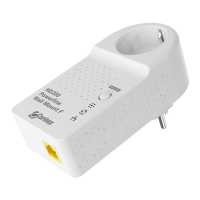
Corinex AV200 Powerline Ethernet Wall Mount F
2.6 Connecting the Wall Mount Adapter
To connect the Corinex AV200 Powerline Ethernet Wall Mount F to your computer,
follow the steps listed below.
1. Once the security configuration and synchronization have been completed
the adapters may be unplugged and taken to the respective places in the home
where the computers will be connected to them.
2. Connect the supplied Ethernet cable to the Ethernet (LAN) port on the wall
mount, and to an Ethernet port on your computer.
3. Plug the Corinex AV200 Powerline Ethernet Wall Mount F unit directly
into any standard electrical outlet.
Note: The Corinex AV200 Powerline Ethernet Wall Mount F should be plugged
directly into a wall outlet, not into a power strip or surge suppressor. Power
strips and surge suppressors can weaken or block the Powerline network
signal.
2.5 Technical Specifications
Standards Compliance IEEE 802.3u
Speed Up to 200 Mbps on physical layer
AC Plug Type US, EU, UK and AUS
LED Status Lights VPI, ETH
Interface 10/100BaseT Fast Ethernet, Powerline
Frequency Range used 2 – 34 MHz
Power Input 85 to 265 V AC, 50/60 Hz
Dimensions 132 mm L x 60 mm W x 65 mm H
Transmitted Power spectral density -56 dBm/Hz
Power Consumption 5W
Safety & EMI UL/EN 60950, FCC Part 15, EN 55022
EMC limits


 To Next Page