23
Adapter Configuration
Corinex AV200 Powerline Ethernet Wall Mount F
3.4.6 VLAN Configuration
When AV200 Powerline wall mount F adapters are used for ADSL extension, it is
important for the operator to be able to distinguish the type of traffic that each
adapter is generating. This is usually done by means of VLAN tagging. The AV200
technology includes the ability to tag all traffic that enters the Powerline network
through each adapter’s Ethernet port. It is only tagging - there is no VLAN filtering
on an AV200 Powerline network.
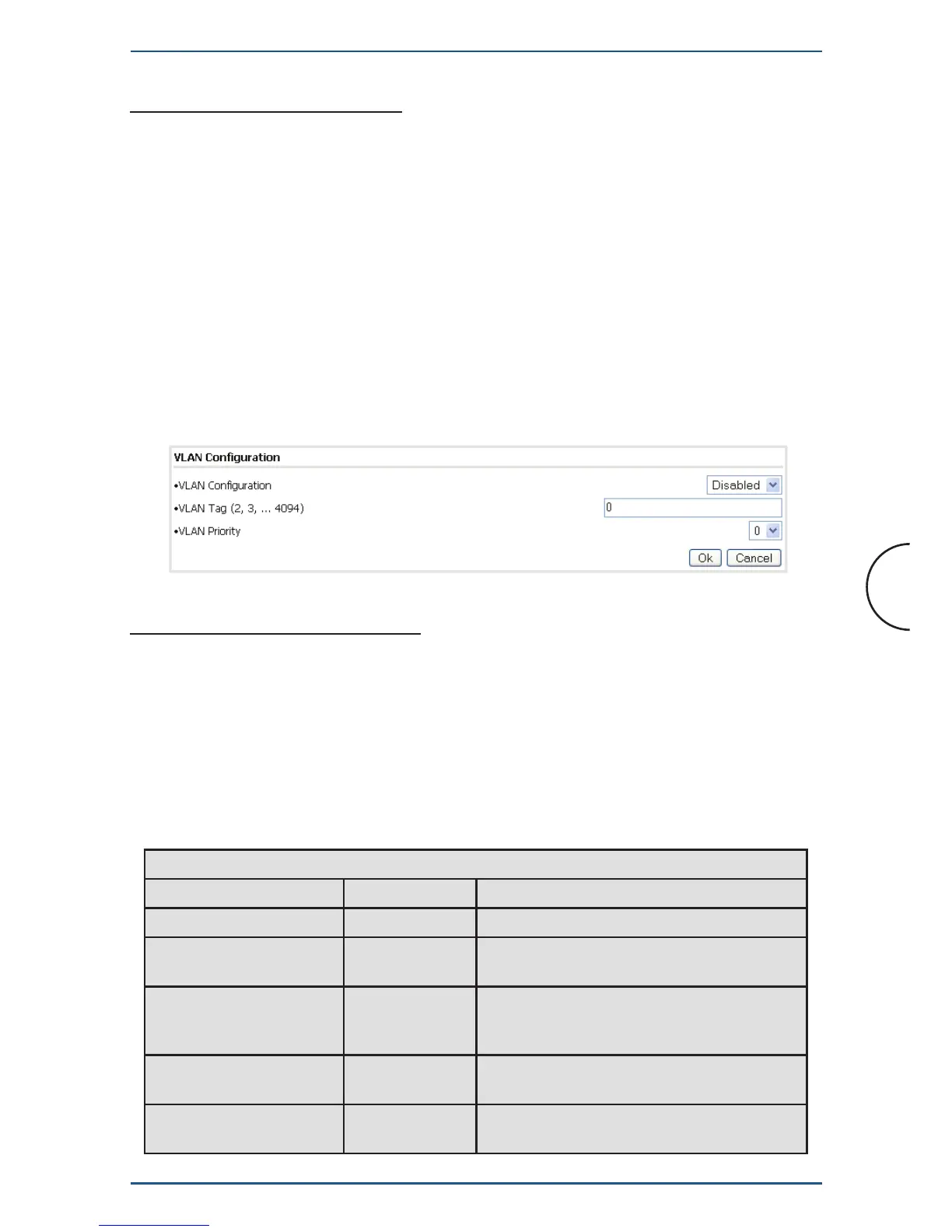
The parameters for VLAN configuration can be set in the form displayed below.
First, the Spirit VLAN can be enabled or disabled (Spirit VLAN Configuration
checkbox). If enabled, the VLAN tag (Spirit VLAN Tag field) and priority (Spirit
VLAN Priority field) can then also be configured.
3.4.7 Priority Configuration
It is possible to configure the VPI LED (the upper one). The LED shows the quality
of the network connection to other AV200 devices. There are two configurable
speed markers. The adapter simply reads the network speed and changes the color
of the VPI LED according to these markers. The default values are 6 Mbps and 12
Mbps.
The behavior of the LED is described in the table below.
VPI
Colour Adapter Status Meaning
Low Red OFF (Standby) Adapter is in Standby mode
Red ON If Powerline link, Estimated application
Throughput < Threshold 1
Orange ON If Powerline link, Threshold 1 <
Estimated application Throughput <
Threshold 2
Green ON If Powerline link, Estimated application
Throughput > Threshold 2
Rotating rapidly in red,
orange and green
ON Adapter is on OBUS configuration Mode


 To Next Page