27
Adapter Configuration
Corinex AV200 Powerline Ethernet Wall Mount F
3.4.11 Firmware upgrade using a TFTP Server
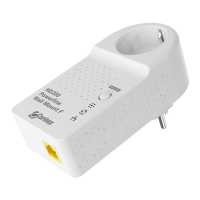
To upgrade the firmware of the adapter using TFTP, a TFTP server must be running
on a computer. We recommend a freeware tool called TFTPD32. This tool can be
downloaded at the following address: http://tftpd32.jounin.net/. Download the
new firmware file from the Corinex web site at http://www.corinex.com.
Follow the steps below to update the firmware:
1. Open TFTPD32.
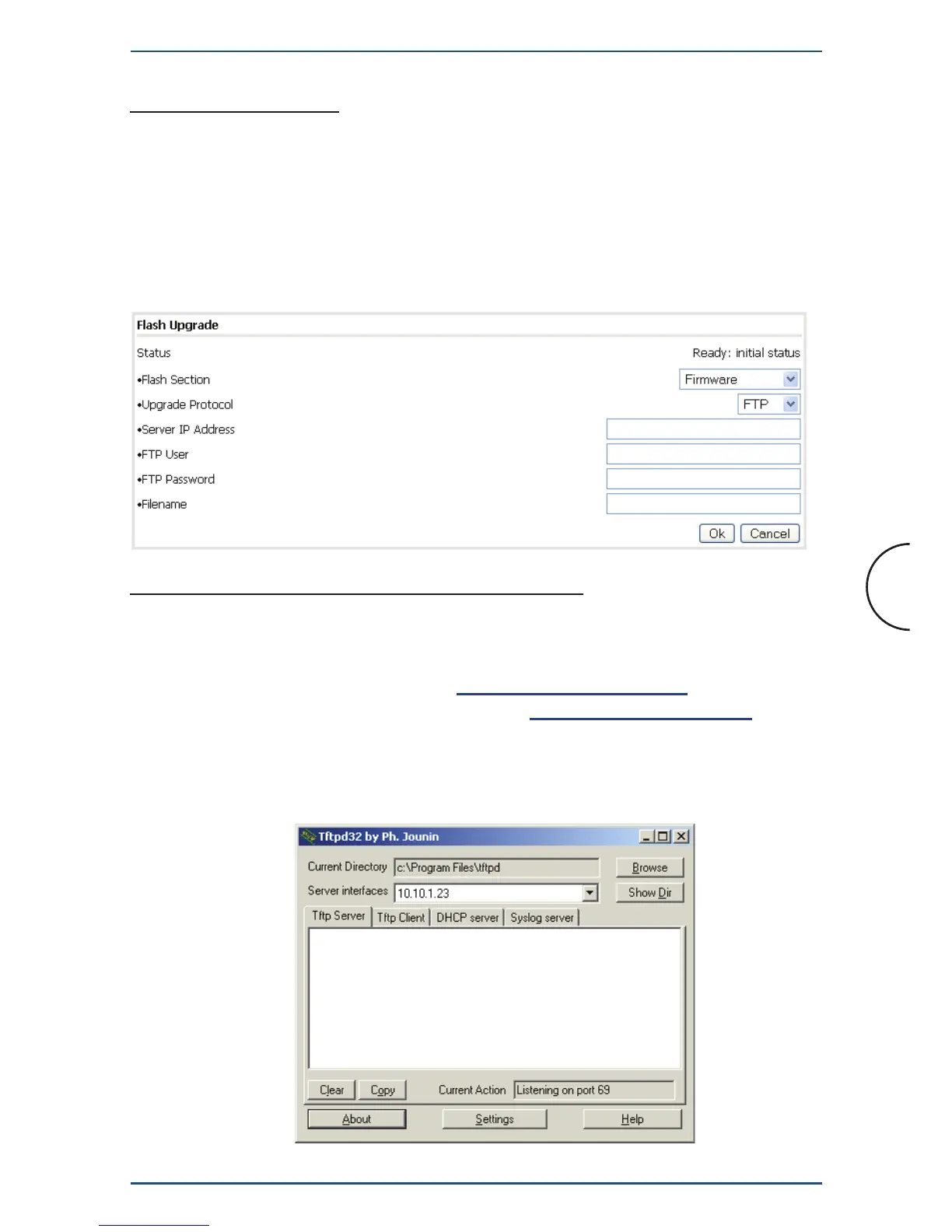
stored in Flash memory. To upgrade them, first select the Flash section to update
(Firmware, Loader or Factory Settings) and the protocol (FTP or TFTP). Type
the IP address of the FTP or TFTP server (Server IP Address field). (If using FTP,
type the user name (FTP User) and password (FTP Password)). Finally, type the
name of the firmware file (File Name) and click OK.
3.4.10 Flash Upgrade
The firmware, the loader and the factory settings (default factory configuration) are


 To Next Page