75mL
Position
Flowrate
0
0
1 2
3
4
5
50mL 60mL 100mL85mL
5
6
0 20 40 60
80
100%
rpm
GEAR
N.cm
Torque
Forward/Reverse
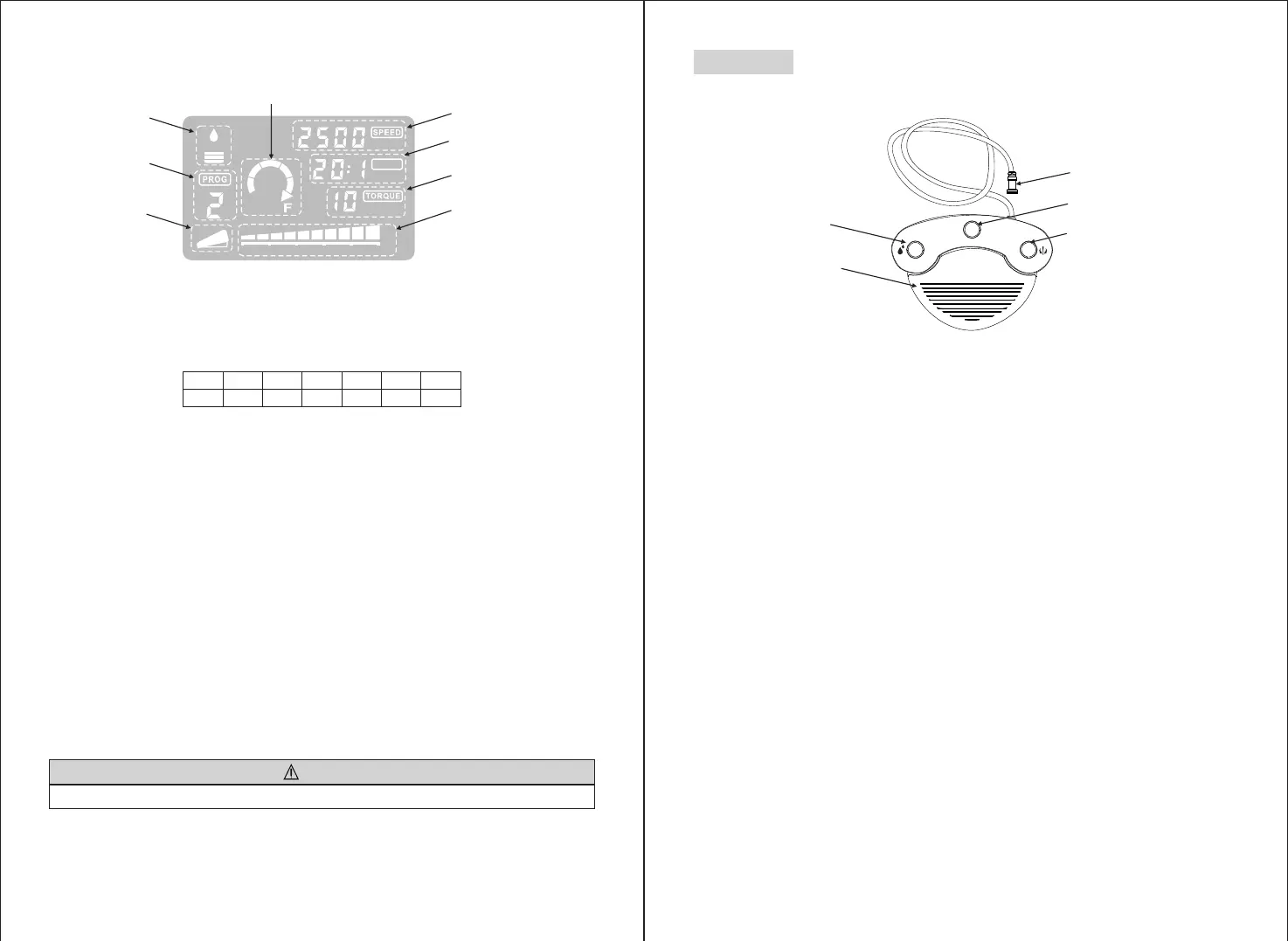
Coolant Flow Level
Program Number
Pedal Link Indicator
Speed
Gear Ratio
Pedal Progress Bar
LCD display on the Control Unit Console
(1) Coolant Flow Level
Displays the selected coolant solution flow level; the selected Flow level is indicated by 1 to 5 levels of
illuminated indicators. No illumination indicates when the Coolant Solution Flow is off.
(2) Program Number
Displays the selected program number.
(3) Gear Ratio
Displays the selected gear ratio of the handpiece.
(4) Forward/Reverse Indicator
Displays the selected direction of the Micromotor.
(5) Speed
Displays the selected speed.
Depressing Foot Control:Rotation speed of the motor displayed on the LCD (Assuming the correct gear ratio
is selected)
Without pressing Foot Control : Max Rotation preset setting displayed on the LCD
(6) Torque: Displays the selected torque.
* When using the 1:1 direct drive or Speed increasing handpiece, the torque is not displayed. (This function is
appropriate for 4:1 increase speed handpiece or more)
(7) Pedal Link Indicator
Displayed when the foot is connected, it is not displayed when the pedal is not connected.
The LCD display panel is produced from liquid crystal and should always be treated with care.
CAUTION
P
Foot Control Cord and Plug
PRG(Program) Button
Forward/Reverse Button
Coolant Solution Flow
Volume Button
Speed Control Pedal
(1) Coolant Solution Flow Volume Button
Use to select 6 levels of coolant solution flow from 0 to 5; each level may be increased by one step pressing
this button. If you press this button in level 5, it returns to level 0.
(2) PRG (Program) Button
Use to select the desired program number. Program numbers will always ascend each time this button is
pressed and released.
(3) Speed Control Pedal
Used to start and stop the Micromotor and to control the speed during operation. The Micromotor operational
speed is directly proportional to the position of the foot control, up to the preset maximum.
(4) Forward/Reverse button
Used to change the rotational direction of the Micromotor. Push once to change the rotational direction.
4.Foot Control


 To Next Page