22
UNLCDHS Programming – User
Basic Parameters for all models including ‘-PRM’, ‘-PRM-2CH’, ‘-DD/SR’ and ‘-AD’ and their variants
Parameter Default Range / Option Description
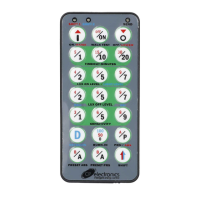
Manual Override
On
– – Turns lights on and reverts to automatic operation aer the period set by Manual
Timeout in the Detector Params menu.
Manual Override
O
– – Turns lights o and reverts to automatic operation aer the period set by Manual
Timeout in the Detector Params menu.
Manual Override
Cancel
– – Cancels the manual on and o overrides, returning the detector to normal
operation.
Note: Certain parameter functions are only available in specic versions of the detectors and these are indicated under the aected parameter headings
within the brackets e.g. LUX Learn Level (V3).


 To Next Page