Setting the Out-feed Table Height
The height of the out-feed table must be
qual to the height of the cutter-head
and loosen the out-feed
ble lock, the jam nuts and positive stop
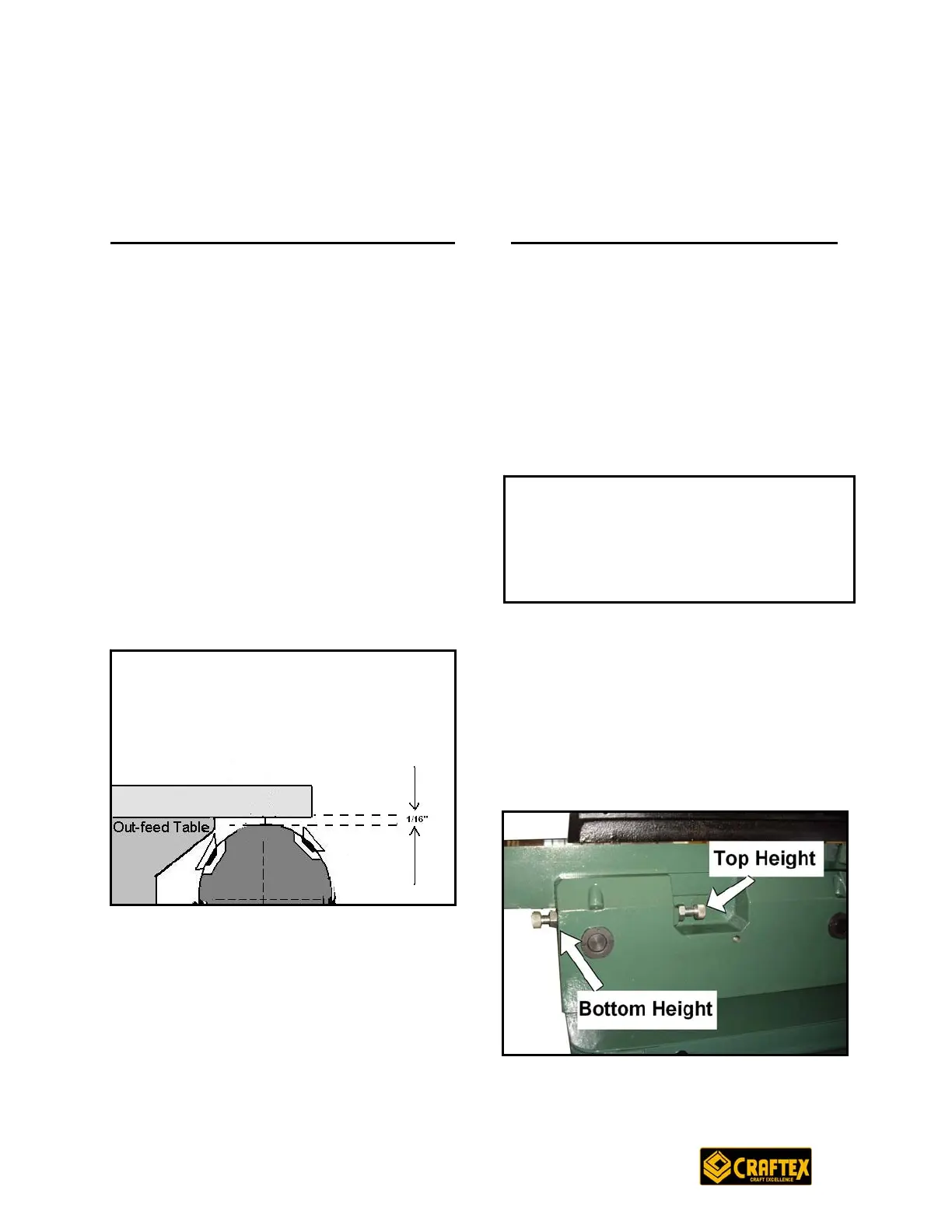
Figure-17 Out-feed table height
Now, tighten the out-feed table lock and
e positive stop bolts and the jam nuts
ight.
e
knives.
To adjust the out-feed table height, first
of all disconnect the jointer from the
power source. Remove the cutter-head
guard and fence
ta
bolts located at the front and at the back
of the machine.
Now place a straightedge on the out-feed
table so that it hangs over the cutter-
head. Lower the out-feed table until the
straightedge is 1/16” above the cutter-
head body. See Figure-17
th
located at the back and front of the
machine. Set the knife height to the new
ut-feed table heo
Setting the In-feed Table Height
The positive stop bolts located at the
back of the machine allows you to adjust
the height of the in-feed table.
The recommended setting for the
minimum depth of cut is 1/32” and the
maximum depth of cut is 1/8” for most of
the operations.
Figure-18 Table positive bolts
OPERATIONS AND ADJUSTMENTS
There are two positive stop bolts and
each bolt controls the top and bottom
range of table movement. The jam nut is
to lock the bolts in place so that they do
not move during the operation. See
Figure-18
IMPORTANT
jury
Do not exceed 1/8” cut per pass on the
machine or kick-back and serious in
may occur.
19


 To Next Page