Section 7 – Operator’s Program
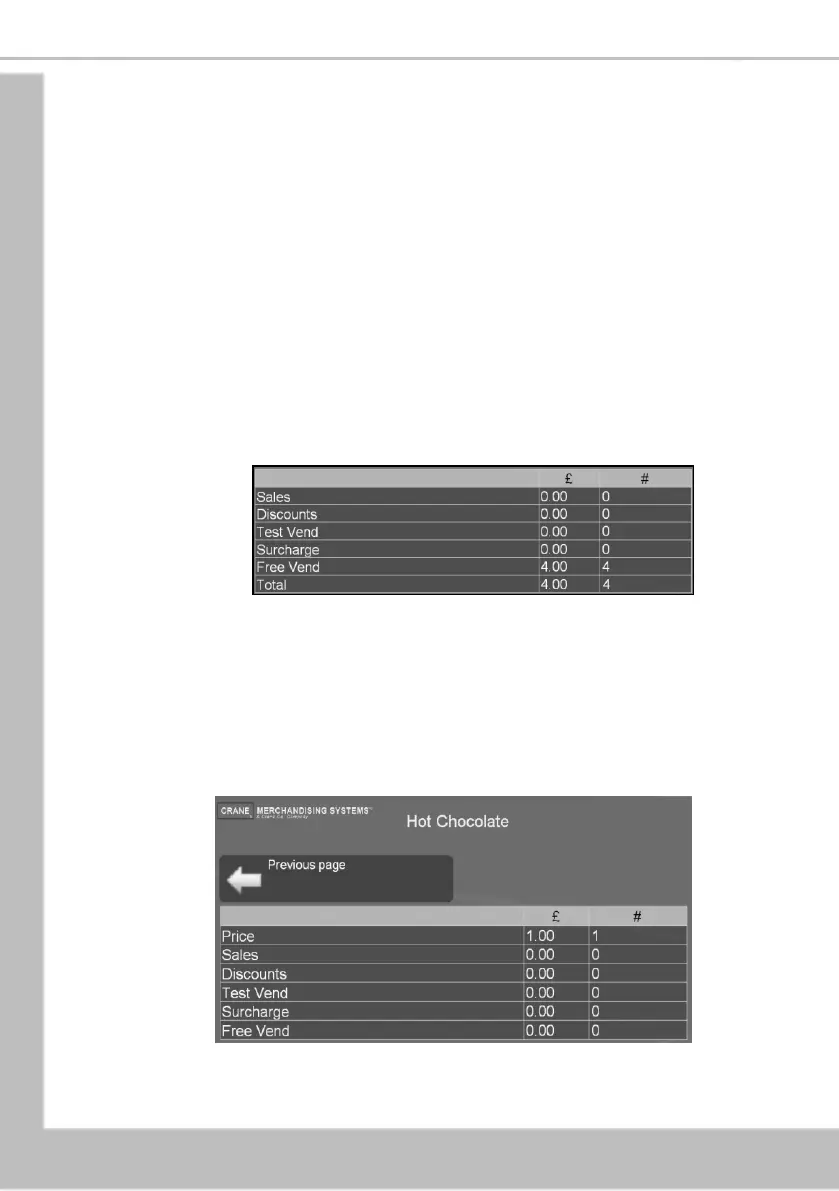
Data fields on the Overall Totals screen:
Displays the total machine sales in £ (NOT including Test Vends or
Free Vends).
Displays the total number of machine vends. This value includes
normal, discount and surcharge vend totals. (NOT including Test
Vends or Free Vends).
Displays the total monetary value of all discounts in £.
Displays the total number of discounted vends.
Displays the total monetary value of all test vends in £.
Displays the total number of test vends.
Displays the total monetary value of all surcharges in £.
Displays the total number of surcharge vends.
Displays the total monetary value of all free vends in £.
Displays the total number of free vends.
Displays the total machine sales in £.
Displays the total number of machine vends.
N.B. All sales data is presented in a format required by the latest European Vending
Association Data Transfer Standard (EVA DTS).
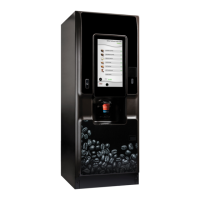
1. The operator can also view and record audit data by individual product: Select By
Product on the Non Resettable Sales Data menu screen. This menu contains all of the
drink selections available from the machine.
2. Select the required product, e.g. Chocolate. The LCD will display the screen as shown
below.
N.B. Individual By Product screens also display the price set for the selection as
shown.





 To Next Page