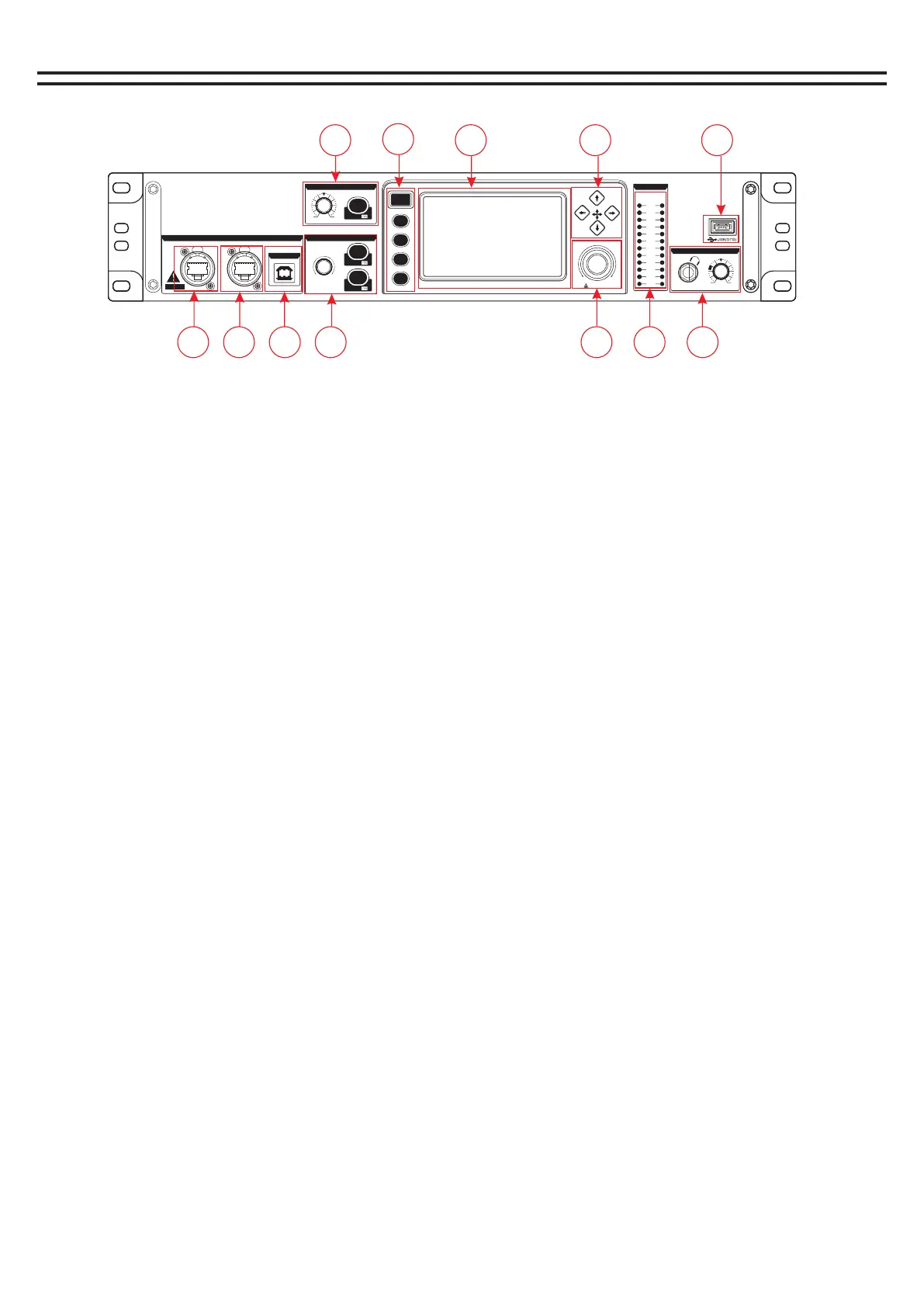
Features - Front panel
1. A2B network extension interface
The network cable is used to connect the mixer (with A2B interface) to realize the expansion of the
number of channels.
2. LINK: External router network cable connection control.
3, USB2.0: connect the computer software debugging and audio card audio input interface.
4, volume knob /PFL monitor key /MUTE MUTE key.
1), volume knob - control the current channel volume signal size.
2), PFL monitor key switch - when this button is pressed, the signal will be output from the listener and
earphone.
3) MUTE channel MUTE switch - When this button is on, you will not hear the channel signal.
5, Input channel gain /+ 48V switch.
1), Gain control
Adjust this knob to increase or decrease the input signal level.
2), 48V phantom power button
Long press the button for 3 seconds to turn on the 48V power supply of the current channel and light it,
indicating that the MIC jack has 48V voltage.
Note: Do not turn on the phantom power until you have connected the microphone.
6, Home button/scene quick call button.
1), Home button - channel selection.
Clicking Open will bring up the channel selection screen.
2) Quick scene call button
Click the corresponding button to quickly call up the first four modes of the scene mode.
7. 4.3-inch 480*272 capacitive high-definition touch screen
8, up, down, left, right selection keys.
9. Multi-function knob
Touch this knob to adjust the parameters with the display screen.
10, input and output monitoring signal indicator light.
11. Monitoring headphone jack/and monitoring knob
Insert the headset into this jack. It is recommended that the impedance of the headset be greater than
150oHM.Monitoring level knob This knob is used to control the monitoring signal level.
12, U-Disk: U DISK interface, MP3 audio input and system upgrade interface.
Pre ss for fi ne
PUS H
AE S50
PUS H
A B
16-C HA NNEL 24 -B IT FIRE WIRE/US B AUDIO INT ERFACE
US B 2.0
-34 +10
+48V
GAIN/TRIM
CHAN NE L LEVEL
MUTE
PFL
DISP/
DISP/
Min M ax
+10
+4
+2
0
-2
-4
-22
-38
-60
L R
-16
-7
CLI P
PFL
-34 +10
PHONES
EX-16-8
Professional Digital High Speed Interface Desk
1
3
2
4
HOME
1 2 3 4
5
6
7 8
9
10
11
12
1
1
2
2
3
5


 To Next Page