6.Plotting servo machine PCUT S operating instructions
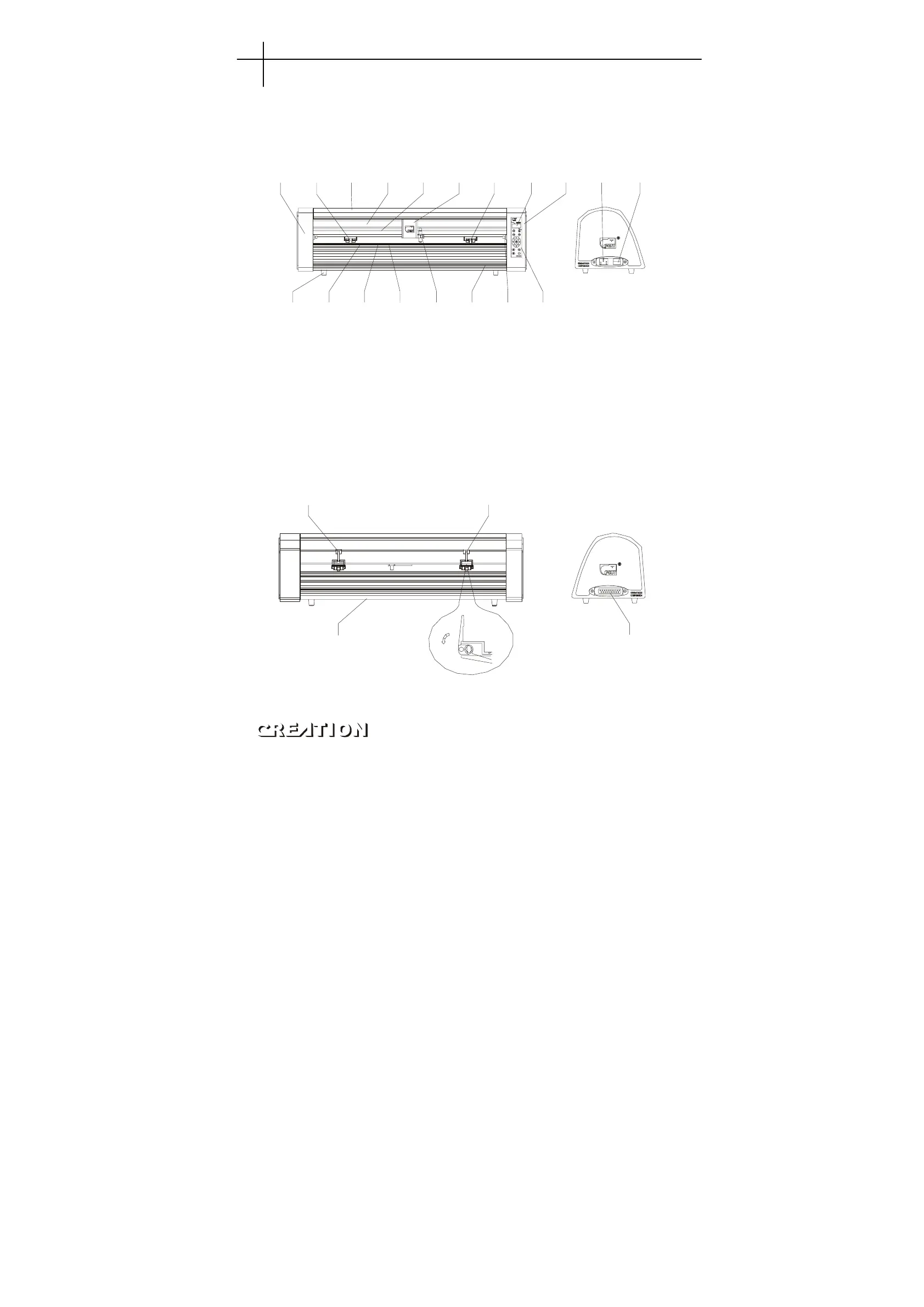
6.1 Names and functions of parts
6.1.1 Frontal view
1 2 3 4 5 6 2 7 8 9 1
11 12 13 14 15 16 17 18
1. Left cabinet 10. Power on/off
2. Paperweight wheel 11. Foot cushion
3. Upper cover 12. Y Transmission Shaft
4. Beam 13. Scale
5. Tooth profile transmission belt 14. Strip cushion
6. Slider 15. Knife clip
7. LCD (Liquid Crystal Display) 16. Trimming groove
8. Right cabinet 17. Reset button
9. Receptacle of power source 18. Control keyboard
6.1.2 Back view
11
23
1. Handle of paperweight wheel 3. RS232 Receptacle
2. Baseboard (containing main board, power source)
Plotting servo machine PCUT S operating instructions PCUT SERIES USER
‘
S MANUAL
22



 To Next Page