Knowing and Installing Your Card 1-7
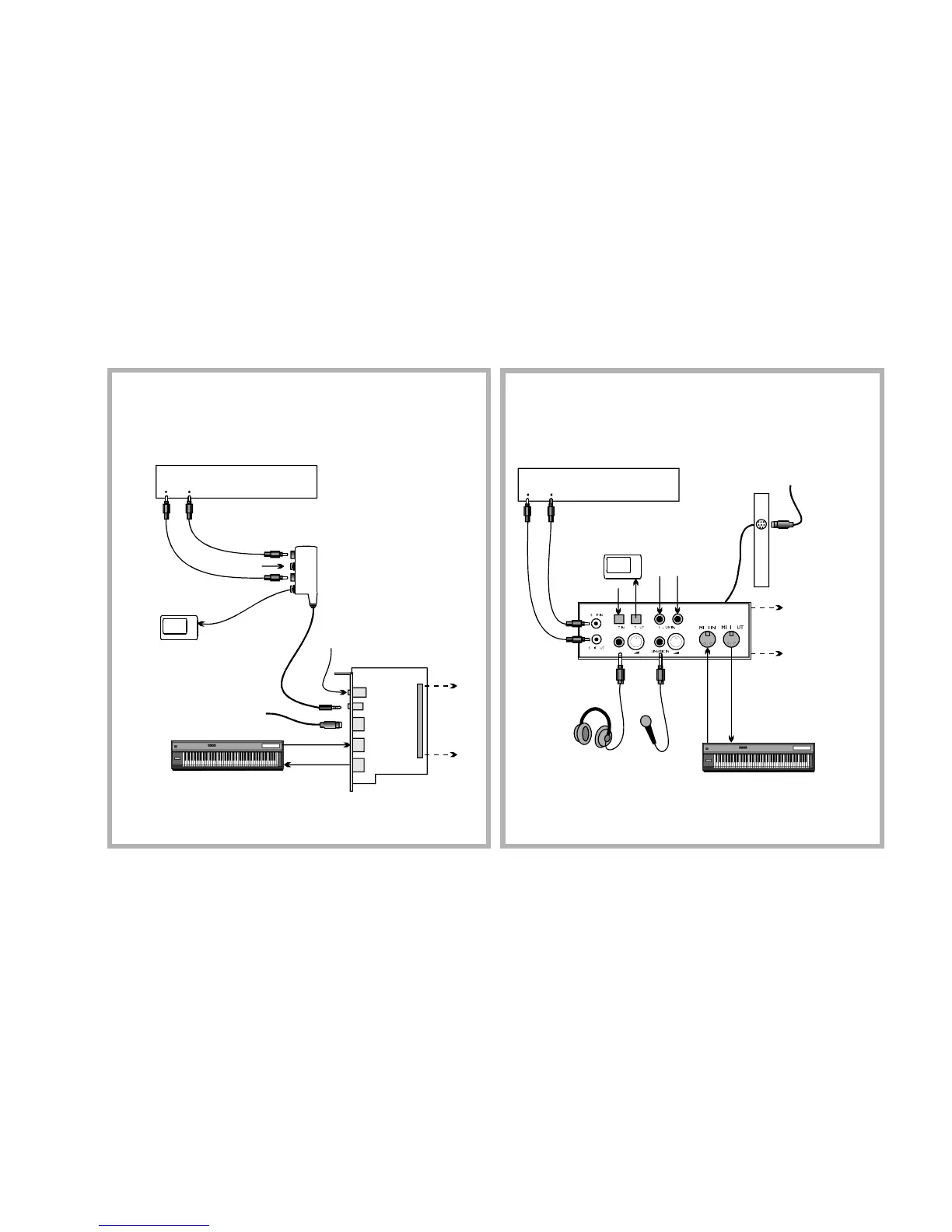
Digital I/O
Module
Optical
Digital I/O
card
Drive Bay
MIDI devices
(e.g., MIDI keyboard)
MIDI devices
(e.g., MIDI keyboard)
2nd analog Line In for an
additional recording device
Line In 2
Digital In/Out
Digital DIN
MIDI In
MIDI Out
Digital device
( e.g., DAT)
MiniDisc
Recorder
SPDIF (RCA)
In Out
Recording to or from an
external digital device
supporting RCA SPDIF
input/output
Recording and Content Authoring
with Optical Digital I/O card and
Digital I/O Module
Connects
to SB Live!
card
SPDIF In (RCA)
Optical
Input
Optical
Output
Digital
DIN
MiniDisc
Recording and Content Authoring
with Drive Bay
Digital device
( e.g., DAT)
SPDIF (RCA)
In Out
Metal
bracket
Headphones
Microphone /
Line In
To Digital Speaker
System*
Connects
to SB Live!
card
To Digital Speaker
System*
*e.g., FourPointSurround
or DeskTop Theater 5.1 Digital
Speaker Systems*
AUX input from
an analog source
(e.g., CD player,
tape deck)
Note:
The Optical and AUX input
jacks are available only in certain
models of the Drive Bay.


 To Next Page