You will need
to
change the factory default settings
of
your audio card or
another peripheral device on your system if any
of
the following occurs:
D
A peripheral
device
uses the
same
1/0
addresses,
DMA
channel,
or
interrupt setting as
your
card (known as a hardware conflict).
D
An external amplifier is used for audio output.
D
Joystick/Game
Port
is
used by your system.
It
is
advisable that you do not change the audio card's default
settings. If you need to change these settings. you should do
so before installing the card in your system (see Appendix
B).
Installing
the
Card
Installing the audio card
in
your
system is simple. so please follow the
instructions carcfu
I ly.
To
install the card:
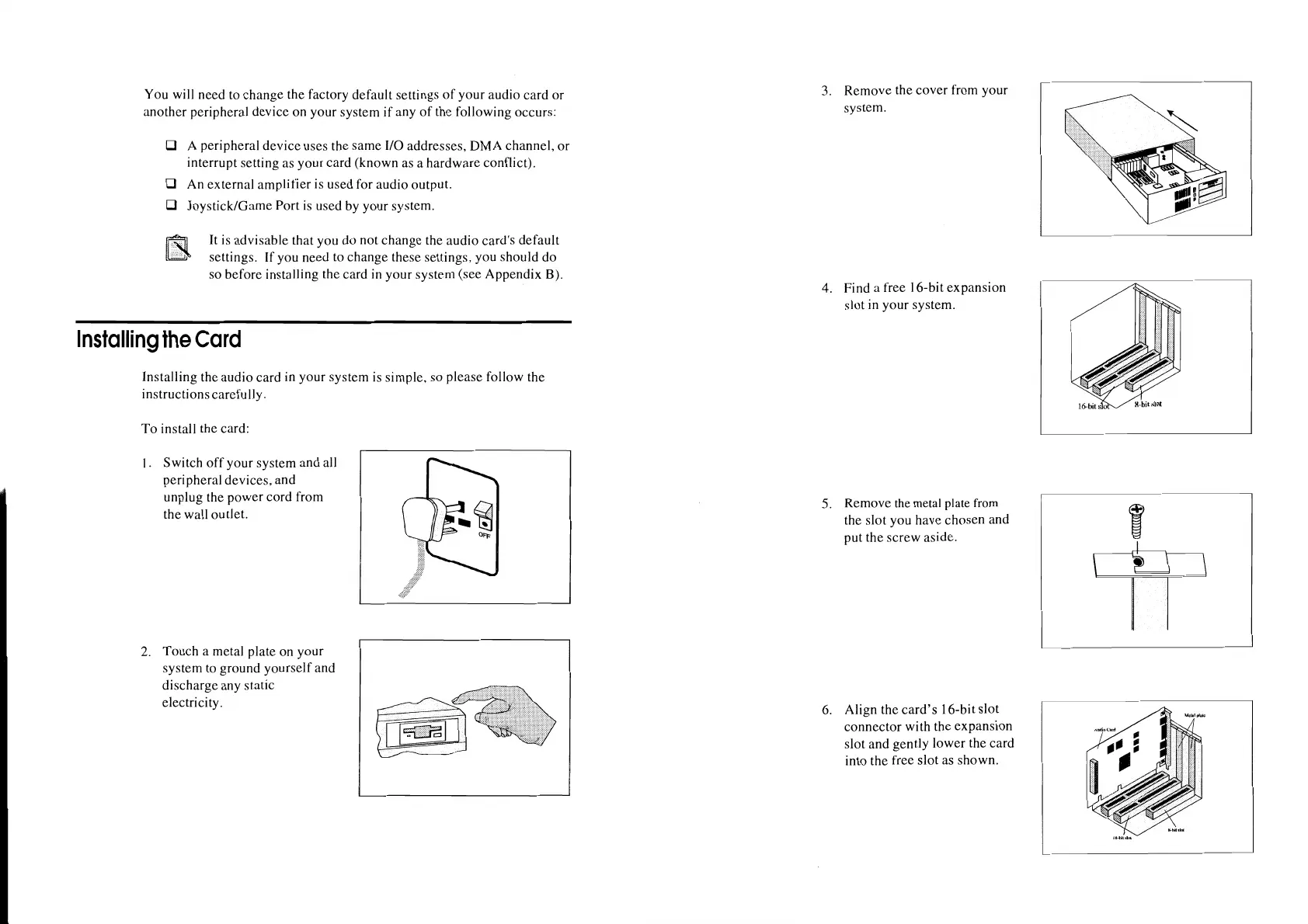
1 . Switch
off
your system and all
peripheral devices, and
unplug the power cord from
the wall outlet.
2. Touch a metal plate on your
system
to
ground yourself and
discharge any static
electricity.
3. Remove the cover from your
system.
4. Find a free 16-bit expansion
slot
in
your system.
5.
Remove
the
metal
plate
from
the slot you have chosen and
put the screw aside.
6.
Align the
card's
16-bit slot
connector with the expansion
slot and gently lower the card
into the free slot as shown.
I
---
----
----












 To Next Page