PC
Spk
Connector
Pin
Assignments
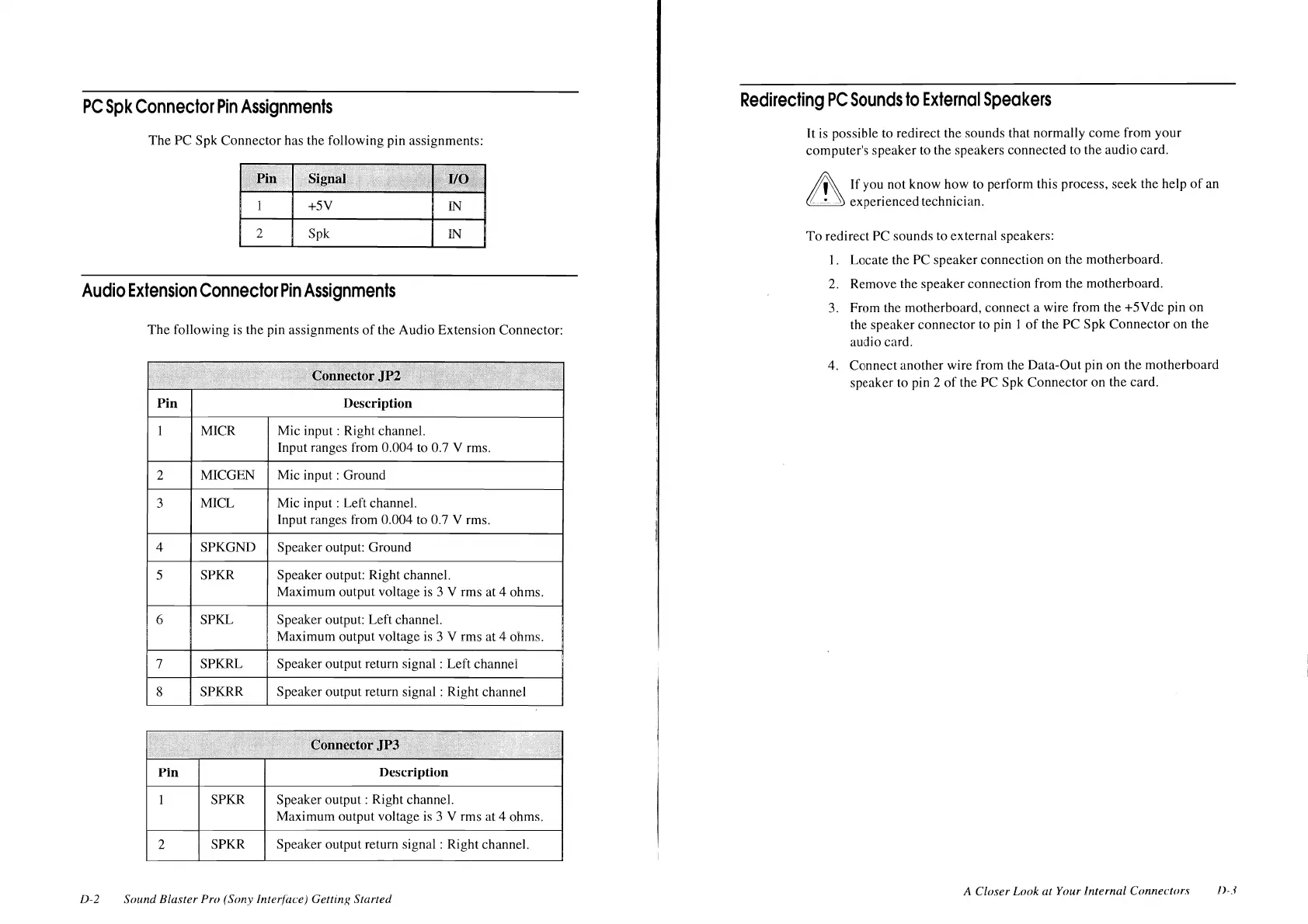
The PC Spk Connector has the following pin assignments:
+SY
IN
2
Spk
IN
Audio
Extension
Connector
Pin
Assignments
The
following
is
the pin assignments
of
the Audio Extension Connector:
Pin Description
MICR Mic input : Right channel.
Input ranges from 0.004 to 0.7 V rms.
2 MICGEN Mic input : Ground
3 MICL Mic input : Left channel.
Input ranges from 0.004 to 0.7 V rms.
4 SPKGND Speaker output: Ground
5 SPKR Speaker output: Right channel.
Maximum output voltage is 3 V rms at 4 ohms.
6 SPKL Speaker output: Left channel.
Maximum output voltage
is
3 V rms at 4 ohms.
7 SPKRL Speaker output return signal : Left channel
8 SPKRR Speaker output return signal : Right channel
Pin
Description
SPKR Speaker output : Right channel.
Maximum output voltage
is
3 V rms at 4 ohms.
2
SPKR Speaker output return signal : Right channel.
D-2 Sound Blaster Pro (Sony Interface) Gettinx Started
Redirecting
PC
Sounds
to
External
Speakers
It
is
possible to redirect the sounds that normally come from your
computer's speaker to the speakers connected to the audio card.
~
If
you not know how to perform this process, seek the help
of
an
~
experienced technician.
To
redirect PC sounds to external speakers:
I. Locate the PC speaker connection on the motherboard.
2. Remove the speaker connection from the motherboard.
3.
From the motherboard, connect a wire from the +5Ydc pin on
the speaker connector to pin I
of
the PC Spk Connector on the
audio card.
4. Connect another wire from the Data-Out pin on the motherboard
speaker to pin 2
of
the PC Spk Connector on the card.
A Closer Look at Your Internal Connectors
n-3












 To Next Page