Certain hardware settings
of
the audio card require you to enable certain
jumper(s)
from a group
of
jumpers. An example
of
such a group
of
jumpers
is shown in Figure 1-6.
Figure
l-6:
A
group
of/(JUr
jumpers.
Identifying
the
Jumper
Locations
l-6
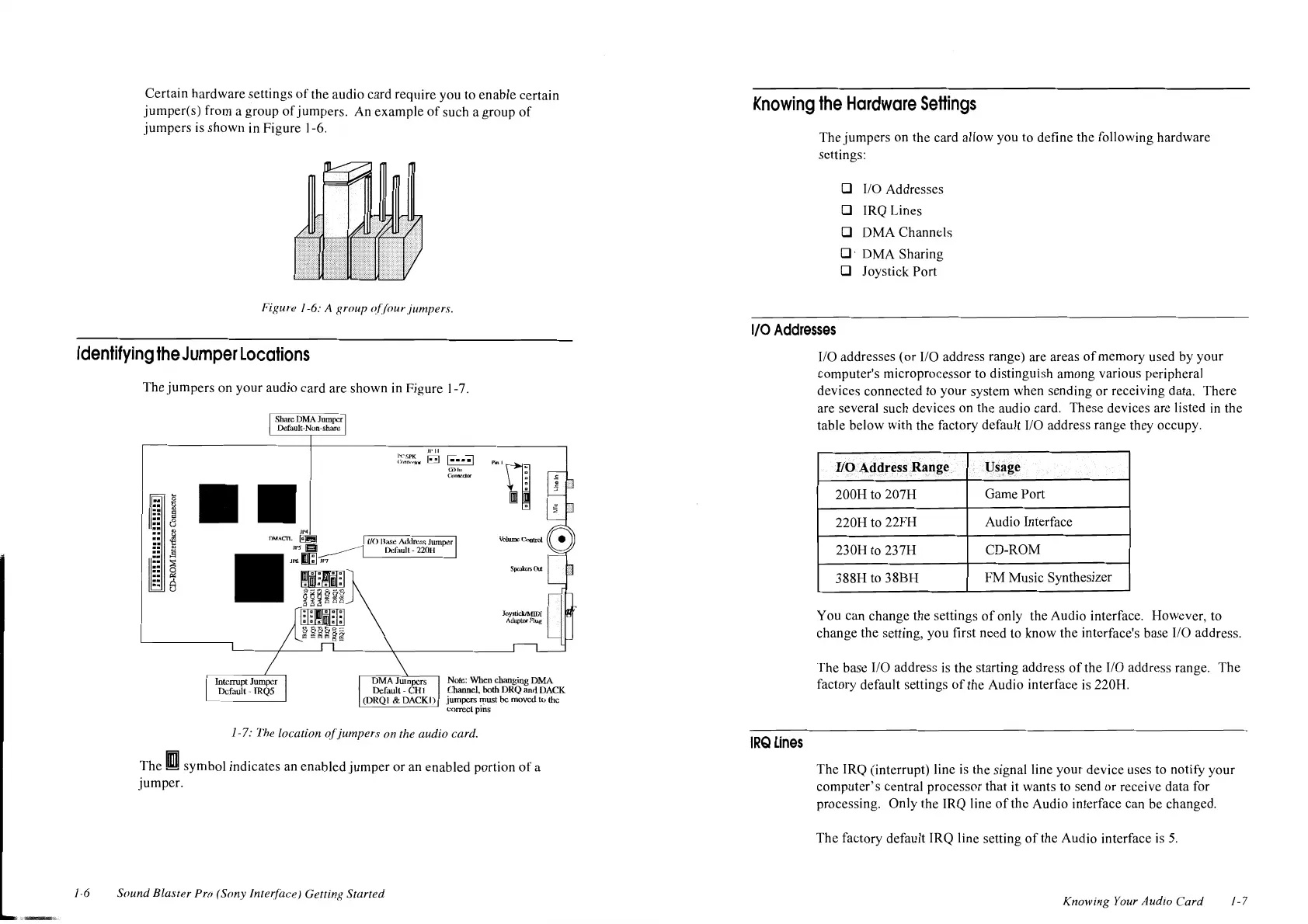
The
jumpers
on your audio card are shown in Figure I -7.
Share lJMA Jumper
Ddaolt-Non·sh:rre
Jl'll
~:~~
R F··!il
,
..
™"C'n-
~
1/0 !lase Addre.%
Jumpt~r
w·;
B --- Ocfaull - 220H
Interrupt Jumper
Default -
IRQS
Jl'6
m:;J-u:;--
DMAJumpcrs
Ddaul!-CHI
(DRQI &DACK!)
Joystick/MIDI
Adii.ptoi-Plug
Note: When changing
DMA
Channel, both
DRQ
and
DACK
jumpers
must be moved
to
the
correct pins
1-7: 1he location
ofjumpers
on the audio card.
The
liiil
symbol indicates an enabled Jumper or an enabled portion
of
a
jumper.
Sound
Blaster
Pro
(Sony
lnter/{1ce)
Getting
Star!ed
Knowing
the
Hardware
Settings
The
jumpers
on the card allow you to define the following hardware
settings:
D
110
Addresses
D
IRQ Lines
D
DMA
Channels
D·
OMA
Sharing
D
Joystick Port
1/0
Addresses
IRQ
Lines
110
addresses (or
110
address range) are areas
of
memory used by your
computer's microprocessor to distinguish among various peripheral
devices connected to your system when sending
or
receiving data. There
are several such devices on the audio card. These devices are listed
in
the
table below with the factory default
1/0
address range they occupy.
IIO
~ddress
R~nge
Ds~~e
....
200H to
2071-l
Game Port
220H to 22FH
Audio Interface
230H to
23711
CD-ROM
388H to 38BH
FM
Music Synthesizer
You can change the settings
of
only the Audio interface. However. to
change the setting, you first need to know the interface's base
1/0
address.
The base
1/0
address
is
the starting address
of
the
1/0
address range. The
factory default settings
of
the Audio interface is 220H.
The IRQ (interrupt) line is the signal line your device uses to notify your
computer's central processor that it wants to send
or
receive data for
processing. Only the JRQ line
of
the Audio interface can be changed.
The factory default IRQ line setting
of
the Audio interface
is
5.
Knowing Your Audio
Card
l-7












 To Next Page